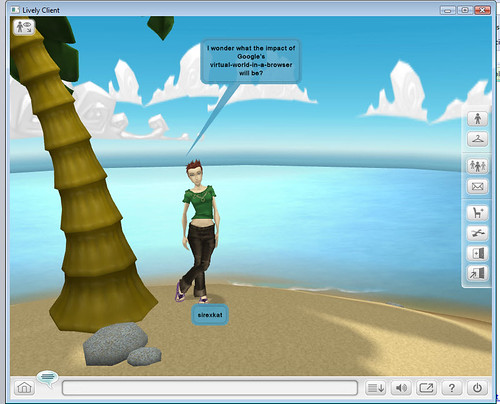
First impressions? Easier to get into and get going than Second Life. I think it’s cute the way that entering an emoticon in my chat animates my avatar eg. a smiley 🙂 makes her jump and laugh. Obviously not as sophisticated as Second Life, but very, very interesting to see what can happen once some decent editing tools are released. And I wonder just who owns the intellectual property in what you create …..
I’ve created my own island, Sirexkat Island. I’ve taken a photo, made a movie and embedded the room right into this blog post. I’d be interested whether that comes out in the RSS feed 🙂
I’m experimenting with a beta screencasting site called Flowgram . Thanks to Greg Schwartz for the heads up and the beta invite.
I’ve used the very simple web-based editing tools to create a little screencast called Adventures in Microblogging . The embed code, which I’ve inserted below, seems only to be a link to the site, but it’s beta and – who knows? – it may be a full screencast by morning.
I can see great potential for this to be used to answer user enquiries in our libraries. If Jing is a simple woman’s version of Camtasia Studio, then the editing side of Flowgram feels like a simple woman’s version of Captivate.
In the screencast, I explain why I am oh so sad that we keep seeing this when we try to use twitter:
I outline the main alternatives that have sprung up in the last couple of years, their pros and cons and why they don’t work so well for me. I finish with a look at Open Source microblogging site identi.ca . I explain why – if it can scale – it may well be the place wher my twitter network migrates, if they need to become microblogging refugees. I *hope* however that twitter comes through this because, as I explain, it does the few simple things it tries to do with great ease of use. (when it works).
According to my friend Wikipedia today, a Hype Cycle :
… in Gartner’s interpretation comprises 5 steps:
“Technology Trigger” — The first phase of a hype cycle is the “technology trigger” or breakthrough, product launch or other event that generates significant press and interest.
“Peak of Inflated Expectations” — In the next phase, a frenzy of publicity typically generates over-enthusiasm and unrealistic expectations. There may be some successful applications of a technology, but there are typically more failures.
“Trough of Disillusionment” — Technologies enter the “trough of disillusionment” because they fail to meet expectations and quickly become unfashionable. Consequently, the press usually abandons the topic and the technology.
“Slope of Enlightenment” — Although the press may have stopped covering the technology, some businesses continue through the “slope of enlightenment” and experiment to understand the benefits and practical application of the technology.
“Plateau of Productivity” — A technology reaches the “plateau of productivity” as the benefits of it become widely demonstrated and accepted. The technology becomes increasingly stable and evolves in second and third generations. The final height of the plateau varies according to whether the technology is broadly applicable or benefits only a niche market.
So, what does it say this year? Well, the terms of agreement by my institution forbid
“reproduction and distribution of this publication in any form without prior written permission”.
… so I’m not going to directly quote the bit that points out that students are leading the change via social software, user generated media and consumer IT devices. Nor the bit that mentions that professors are decreasing their dependency on technology delivered by their institutions and going for more autonomously controlled solutions.
I find it extremely interesting that they have dropped “Next Generation Library Management Systems” from the cycle, explaining that since last year they are used by over 50% of higher education institutions. O RLY? (Apart from the linguistic quibble that this would make them “current generation LMS”, I’m not sure that there has been a radical change of LMS structure and implementation across the sector )
“Virtual environments / virtual worlds” is the item at the Peak of Inflated Expectation. I guess that means it will not get any more hyped (phew!) and hopefully it will get through the resultant disillusionment to become a mature, productive technology. “RFID for Library Managment” is making its way up the slope of enlightenment.
Learning content seems to be the most changeable and hard to predict, with “Podcasting Learning Content” and “IP Video for E-Learning” becoming obsolete before they plateau, due to being absorbed as part of other technologies like social networking tools. “Lecture Capture and Retrieval Tools” is just beginning its climb.
I find it interesting that the business function of technology and the educational function of technology are both considered in this report. It makes sense, as it is aimed at a particular sector, however some technologies that are useful for education have a different degree of usefulness for administrative functions. I’m thinking of items like “Web Based Office Productivity Suites” (climbing up toward the Peak of Inflated Expectations), “Cloud E-mail for Higher Education“, “Personally Owned Devices with Campus Network Access” and “Tablet PCs“.
If you can get hold of it, it is worth reading. It *is* aimed at CIOs, so it doesn’t discuss in depth those personal – almost artisan – learning tools that students and staff are beginning to use. It does suggest that we need to “change mindset” to cope with the challenges these bring.
UPDATE: I emailed the Gartner contact for our campus to ask whether I was violating any agreement by paraphrasing like this. He was OK with it and said they do often give permission to quote directly if you fill in the right forms 🙂 : http://www.gartner.com/it/about/vendor_relations.jsp
Librarians who twitter have tonight been all atweet about the “Top Ten Librarians Who Twitter” list included in the article – based on the number of followers. List below.
10 Most “Followed” Librarians on Twitter
(with Twitter name and number of followers)
Jessamyn West (jessamyn) 1,200
Connie Crosby (conniecrosby) 1,188
Andrea Mercado (andreamercado) 698
K.G. Schneider (kgs) 606
David Lee King (davidleeking) 548
Amy Kearns (akearns) 463
Michael Stephens (mstephens7) 429
Michael Sauers (msauers) 396
Blake Carver (LISNews) 374
Beth Gallaway (infogdss29) 321
Because I like counting things, and I wanted to see whether there were any patterns or similarities, I grabbed some other stats from the profiles of the listed librarians. As at 9:30pm Western Australian time on 1 July, it looked like this:
Name (login) followers, following, follower:following ratio, number of updates, followers per tweet
Registrations for the second WA Library Unconference are now open. The theme this year is – Library 2.0 and Beyond: getting our hands dirty. We hope to include half a day of small hands-on workshops and a “technology petting zoo” with gizmoes and gadgets to fiddle with. Sessions focus on discussion rather than single person presentations.
DATE: Friday 22 August 2008
TIME: 9:30am – 5pm
VENUE: State Library of Western Australia
The venue only holds 75 people, so it is first in, first served. Registration has two steps. 1. Put your details on the Registration 2008 page. 2. Go to the What is happening on the day 2008 page to put your name down to do something. We need people to present sessions, suggest session ideas, co-ordinate funding, keep accounts, to order lunch, to collect lunch on the day, to record audio and vision of the sessions, clean up, look after rooms on the day, set up for the “Inspect-a-gadget” session, update the wiki for sessions, be gophers on the day and anything else they think to offer.
A new feature this year is “Libjam”. While we are tallying up who wants to go to which session, we’d like at least 6 people to take just 3 minutes to share something their library is doing to “get hands dirty”. You can sing, dance, present a clay model, a mini movie , just talk – whatever fits in 3 minutes.
An unconference works on the principle that whoever turns up is the right person and whatever you discuss is the right thing. People prepare topics, but sessions are decided on the day. Everyone is expected to participate by either presenting, joining in the discussion or doing another job. To see what happened last year, see What happened at the Library 2.0 on the loose unconference in 2007 here.
This is a free event again this year. We are grateful to the State Library for providing the venue. Thanks to Murdoch UniversityLibrary for providing sponsorship for lunch.
I gave a 10 minute presentation at the start, just to get everyone thinking and asking questions. I’ve added audio from the session to my slides and put it at slideshare.net as a slidecast, Learn how to be a good trendspotter and early adopter. (embedded below).
It was an excuse to try out MPOW’s new Zoom H2 Field recorder. I literally pressed the record button and put it on the table and forgot about it. Hence the sound dipping as I turn away from it. Without a mike or the angle to record set, I was very pleased with the results.
I’m always very impressed at how intelligently and generously people share their ideas at unconferences, and this discussion was no exception. I’m also struck at how different computer security rules are from workplace to workplace, and how creative people can be to get around them.
I learned lots today too. I made an animated fish wearing sunglasses that smiled and blinked during a hands on workshop about flash animation. I heard all about moodle (pedagogical open source content management system) and had a play on a moodle site as a teacher and student. I attempted to download and install it on my laptop as part of the session, but couldn’t. I was very impressed that Peter Spicer-Wensley from Swan View Senior High School actually bought in some rebuilt old desktop PCs that he gave away pre-loaded with moodle for people to try out. Very creative.
I’ve been to enough unconferences now to pick up a pattern – the slump about an hour after lunch. By then presenters who stayed up late during the week are beginning to flag, other participants don’t have any more room left in their heads, and lunch has made everyone sleepy.
It was nice to catch up with Sue Waters. I was sorry to miss her sessions on Edublogging and Wikis, but appreciated the help she gave me at the end of the day when I wanted some advice about plugins for WordPress Mu. She was the reason I packed my ugg boots in the car. On twitter in the morning she wanted reassurance that ugg boots were suitable dress for an unconference, so I had mine in reserve to whip out in sympathy in case people laughed and pointed at her feet.
…. well, only if you want to be up to date on software tools like video, citation bookmarking tools and building aps in Facebook. Only if you want to see extremely engaging examples of librarians creating screencasts.
BIGWIG stands for the Blogs, Interactive Groupware Wikis Interest Group. It’s a division of the Library and Information Technology Association, which is itself a part of the American Library Association. Their first shindig last year covered twitter, meebo rooms and folksomies among other topics.
What is also radical is the way that the content of the sessions are made available before and after the event. Last year they set up tables where people could talk to the presenters about the particular topic that interested them.
This year, they are experimenting online too – the Your BigWig site has been up for a couple of months,with topics determined by a vote. They are also livestreaming the event. And you can follow them here:
Should academic libraries be obsessing so much about teaching the discovery of resources? Should we turn more attention to teaching the evaluation of resources ? Who was Professor Rudolph G Briggs of the Department of Psychotechnology and did he really have to die in the pursuit of information literacy ?
OPTIMUM ACCESS TO THE BEST RESOURCES ?
I’ve been reading the JISC & SCONUL Library Management Systems Study which has been out for around three months. This has a great horizon scan as well as several other “stand alone” chapters about factors influencing the choice of future library management systems.
I found myself nodding vigorously when I read about the existing business model for academic libraries:
The business case for the library is predicated on the assumption that the library is the authoritative source of information, and presents optimum access to the best and most appropriate resources in the most efficient way. This raises a dynamic tension between ‘reliable’ and ‘suspect’ sources and questions about the nature of authority.
The subtext of the report is to question whether this business model is still relevant. What if most of our users want “good enough”, not “best”? Can we really claim that it is libraries that deliver optimum access in the most efficient way? What about what the report calls the “gorilla in the room” – Google ?
THE GORILLA IN THE ROOM
Academic libraries seem to be focusing so much energy and attention on discovery tools. Tweaking them, trying to get them to play nicely together, and even turning our attention to the usability of our websites. Vendors are trying to sell us ill-defined “vertical searches” that try to emulate Google’s simplicity but claim to eliminate Google’s noise.
A lot of energy in information literacy classes seems to go into ensuring our students understand our discovery tools. In the last couple of years, some libraries have been trying approaches like starting with Google as an entre to showing their own discovery tools. ( ‘Path of least resistance: from Google to Databases’ ).
I wonder whether we should shift our focus much, much more toward the evaluation of resources, rather than the discovery of them. The student who only ever uses Google, the academic who bans it and the librarian who only teaches about resources “owned” by the library all have one thing in common – they are focusing on the source and not the resource. They are privileging the means of retrieval, rather than what is retrieved.
Surely it would make more sense to teach students how to work out whether an item is authoritative, well researched and/or suitable for citing in an academic work (these factors do not always overlap). Instead of a small section of an information literacy class, what if evaluation of resources was made central? What if, like Iris Jastram of Carleton College, we tried “teaching databases backward” – starting with a resource and looking at what elements were retrieved, how and why ?
Knowing how to assess whether a retrieved resource is fit for the purpose would “inoculate” our students against using inappropriate discovery tools. Not getting quality resources? Move on to a different discovery method. The starting point is knowing what is a quality resource.
Well, do we have the skills to evaluate what is retrieved and pass that information on to our students? I don’t know.
EVALUATION SKILLS
It’s no longer a case of looking for a “.edu” suffix at the end of the web address or whether the item is cited by other sites. Laura Cohen and Trudi Jacobson, librarians at the University of Albany, SUNY, illustrated this when they created a fake web page for an information literacy class back in 1997 ( see. The Customer is Always Right Part 2 ). Their completely fictitious Dr Rudolph G Briggs, who wrote an equally fictitious seminal work on the subject of Internet Addiction is today still cited on several online health sites . In fact, Professor Briggs was only killed off this year , presumably when Laura Cohen retired.
We need to know a bit more about the mechanics of how websites are published than the average user if we want to be able to teach how to spot a bogus site. We should know, for example, why phishing works and how to spot a fake site. We need to understand Search Engine Optomisation and how websites are manipulated to rank higher on sites like Google. We need to understand the commercial model that led Google to set up Google Scholar and Google Books and how this limits what is retrieved. We need to understand new scholarship and where media like podcasts, blogging and collaborative scholarly tools fit in each discipline, instead of automatically presuming that tools dubbed “scholarly” by vendors will produce better results.
I’m sure that almost all academic libraries are designing information literacy classes that include elements of “evaluating your resources” – usually in sequence with “define question, choose your sources, evaluate, cite”. I’m concerned that some of the items we currently ask students to consider when assessing resources are beyond their life skills when they enter university. Where does the work sit in relation to the body of literature in the discipline?. Is the publishing body a reliable source? Does it have a biased point of view? Does it have the depth of research that makes it valuable? Is the research design sound ? This is sustained and demanding academic work and involves skills that people come to university to learn.
… other than crosschecking online information with references, journals and libraries, students do not see that there are any more rigorous ways in which students ensure information is credible. This cross checking would be complex and time consuming, so they are comfortable using their online sources, therefore, and do not believe that their learning suffers.
PUTTING RESOURCE EVALUATION IN OUR BUSINESS CASE
What I have a hard time imagining is *how* to design a series of information literacy classes to bridge the gap between uncritically using Google and a thorough intellectual assessment of scholarly resources. How do we break it into small, engaging components that build on each other to give those critical thinking skills? It is much easier to teach students the mechanics of searching, of discovery.
Is it encroaching on what academics should be doing as part of their course? Should schools have already taught them this by the time they set foot in our libraries? It’s definitely beyond our traditional brief, but given that we no longer have a monopoly on the best discovery tools, is it time we sold the library as a place that has value because there are smart people who can give you personalised help to evaluate your information needs and the resources you find?
I like this. I bounced up and down on my seat clapping my hands when I got this working.
Today I streamed video and audio live from my webcam via veodia.com straight into Second Life. I’ve set it up for a presentation to New Zealand academic librarians during their conference next week, Libraries of the seven C’s .
Here’s a one minute clip showing the setup. The visual and audio is captured straight from Second Life, no dubbing. Audio and visual were a bit out of sync, but during upload, this was exacerbated. The beautiful auditorium is the work of a Murdoch University student, Mandy Kerr, who has done an amazing redesign of the island.
Interesting that the YouTube clip is more out of sync than the Flickr one.
Here’s how I did it.
Livestreaming
1. Sign up for a free account at veodia.com . Unlike Ustream, Veodia output can be played in Quicktime, which is the format Second Life needs.
2. Check your upload speed using something like speedtest.net . Veodia requires an upload speed of 500+ kbps . Mine is around 800, but I think it may dip under 500 every so often, so I cannot stream from home.
3. Switch on your webcam
4. Select “Start new btoadcast”
5. Press “start”
6. The footage is streamed onto a web page, for which you will get a link. This link is the same each time you restart the show.
7. Find the bit of code starting with “rstp”. This changes for each show. This is the code you will need for Second Life.
8. Log in as the island owner.
9. Go to World>About Land > Media.
10. Paste the “rstp” code into the box and select “set”
11. Check in the same window to check what is set as the “default media texture”. If you have not changed it, then it should be kind of grey.
12. Create a simple media viewer by creating a cube using building tools. Add the “default media texture” as the texture on the outside of the cube.
13. Ensure that your video preferences are set to automatically play video
14. All should work. I found that veodia streams varied, and sometimes you need to restart several times (and re-paste the rstp) to get it working. I checked in the web page that the show streamed to to see whether it looked flaky.
3. Resize the slides to at most 512 x 512 pixels. This will make them load quicker. The dimensions mean that SL won’t try to change the dimensions as it uploads. If they are kind of squished, you can always stretch the texture when you put them out to make them the right proportions.
4. Use batch upload as textures to Second Life ( 20 @ 10Lindens each = about 80 cents )
5. Create a square object and squish it to screen size.
6. Grab a premade Slide Viewer scipt from the ICT library on Info Island , or do a bit of searching about to find one you like.
7. In “Edit” mode, drop the script and the images for the slides onto the “contents” tab. The image will change each time it is touched.
I decided I wanted “forward and back” arrows, but didn’t know enough scripting to make them. My clever SL friend, Brian A Corleone, gave me a viewer that was just the ticket, and I used that.
A problem with slide viewers is that it can take ages to download and view each slide. Brian gave me a tip. Create objects with textures the same as the slides and place them near the viewer. They can be teeny tiny. This forces the viewers’ PC to download and cache the textures, so that it doesn’t do a fresh download when the slide is displayed.
Making the video clip
1. Download FRAPs to capture the audio and visual. If you want to record for unrestricted time without a watermark, you can buy it for AUD47.
2. Set Second Life and FRAPS running. Use the record video hotkey to switch it on to start, and off to finish
3. FRAPS records a huge .avi , which can only be played by someone who has FRAPS on their machine, so you need to convert it before it can be uploaded
5. Go to DivX to download their codec. This tells Virtual Dub how to compress the clip so it can be played on many players.
6. Open Virtual Dub and chose Video>Convert. Select the DivX encoder
7. Go to Tools > Filter and use “add” to select a “resize” filter. Play around to find a way that you like to get the clip to a 4:3 ratio. This may be by cropping or letterboxing. YouTube clips are 320 x 240 pixels, so you may like to set the size to this.
8. There is no step 8. Tell me in the comments if you actually have read this. Instructions are usually so boooooring that you just skim through to find the bit you need. As it should be.
9. Go to File > Save as .avi. It should start churning away.
10. Go to the directory and find the clip. Upload to YouTube or wherever.
11. Rest.
UPDATE 28 JANUARY 2008:
Khashai Steinbeck left this comment below:
It seems that veodia.com no longer offers free accounts. Instead, what they offer now is a free trial for 24-hours. Furthermore, when I tried the trial, I did not see anything about broadcasting… Kinda looks like they switched the whole thing to a pre-recorded format. So, quick heads up to anyone following this route, it is certainly not free anymore, and it may not even work at all.