So, what do we teach in university library technology courses? Part 2.

Uncategorized

A couple of days ago I shared that I thought it was a copout for the profession to express only a demand for engaged lifelong learners from library school courses at universities,  when this is what any employer should expect of any graduate, So, what do we teach in university library technology courses? Part 1.

If you want to see an interesting discussion of whether getting a degree in librarianship is really worth the cost, and whether one needs it to do the work one wants in a library, or to work as an excellent library worker, please see Andy Woodworth’s  The Master’s Degree Misperception, Emily Lloyd’s excellent  Response to “The Master’s Degree Misperception” and Andy’s further response, The Master’s Degree Misperception, Ctd.. Comments are very interesting, but I was left with the overall idea that if we could all have Emilys in our library – with or without Master’s degrees – libraryland would do just fine thank you.

O'Brien, T. (2006). Questions. Retrieved from http://www.flickr.com/photos/oberazzi/318947873/

At the end of November I will be reconsidering what I am teaching in my classes about technology and about public librarianship. Here are the questions that will not go away for me.

Do librarians only get their professional skillset at university?

There was also some debate in some of the sessions at the ALIA Access Conference at the start of September about whether the different streams of librarianship – academic, special, school, public – had enough in common for there to be a common skillset that we should be teaching. Or is it that we prepare graduates with the basic, basic skills (in what??) and then the profession should expect to take those graduates under their wing for a couple of years of specific coaching in the area where they work. If so, it would point to it being very hard for librarians to cross sectors once they were employed, and (apart from school libraries or academic libraries that may have specific extra academic requirements) this is not exactly my experience.

Is there a difference between university and vocational training?

Are the qualities / skills required to complete a librarianship degree are the same as the qualities / skills needed to work as a librarian? Should the outcomes be wholly vocationally focused? I am thinking of the opportunities that people get in their studies of theoretical physics or pure mathematics at university. It seems that very small parts – if any –  of these courses focus on real-life skills that a physicist  might need like how to use corporate email, budgeting or managing lab technicians. Are we doing our graduates a disservice if we focus too much on vocational skills?

If we pare away the practical, on-the-job skills that we can teach, what is there left to teach an undergraduate? I am the first to admit that much of the professional literature in librarianship still consists of very vocationally based “how we done it good using this kind of tool” types of papers. Is librarianship closer to veterinary studies or nursing where practical hands-on units are what the graduate needs?  I would guess that most students enrolled because they want to be librarians, not because they want to engage with theoretical niceties of library science. But are we doing the profession a disservice by not having a greater component of theoretical engagement and deep thinking about the profession – something that one is often too busy to do when on the job ?

So – what do I teach?

So – I am teaching a subject called “Information Management Technologies”. It is the basic introductory unit for first years and postgraduates. I am unsure what the profession requires in the area of technology that can and ought to be taught at university level. To be very frank, my main aims are to ensure that the students come out the other end  unafraid of technology, willing and able to jump in and tackle unknown technologies and to see themselves as powerful when it comes to technology use. To be able to look at a problem and assess tools available and apply and modify them to produce a solution – and to know how to share that solution and get support on the way. But again – these are generic skills, not specifics. But … I cannot believe that I should  just cover any old subject matter I need in order to get this across.

I know that we teach management in library school, rather than sending students off to the business school because it is essential that we provide *context* . I think there has been a similar approach with library technologies.  Currently the syllabus of the unit I teach has a lot of generic technology material – how to use Microsoft Excel or Access, how Groupware is used in corporations, how the Internet works. My aim has been to take this material and inject context, context, context to it – if you are a librarian or a records manager, here is how you may use these skills, here are the problems you will have that need to be solved with these. The problem is that I still have an uncomfortable feeling that part of what I am teaching is “remedial technology skills”, rather than library/records management technology. Should we be spending class time ensuring that students know how to use the mailmerge function in WORD? If we don’t teach it, who will? Are we trying to churn out super-duper office workers rather than people with specific skills at connecting information and people?

I really do not have a clear answer to these questions. I know that librarianship is often a second career choice and often first years do not have the basic technological skills and confidence that they will need in the profession. There is no point trying to explain APIs or getting them to create a feed using Yahoo Pipes if they do not have a basic understanding of what an operating system is,  how a database is structured and how to export data between systems. I do feel a bit like I am letting the profession down, and stymieing higher theoretical engagement with information studies, if I spend more time teaching generic technology skills. It is possible, however, that this is entirely appropriate.

I also need to be careful not to bleed over into subjects like Information Organisation or Reference materials or Collection Development – as this material is covered by other areas of the course.

So – what do I make assessable?

Smart, efficient students game the system. Find out what parts of the course are worth how much, and focus attention – which is often shared with a job, a family and a life – on getting the highest marks for these.

I am wondering whether my approach for working out what I should be teaching should start with what I should be assessing? It goes against my ideas about learning  being a chaotic, community-aided, delightful engagement of curiousity. But although my aim is that students learn and have a delightful, stimulating time doing it, it seems to me that their bottom line is to get qualified and employed. Which may be at odds with the profession’s expectation that they come out as engaged lifelong learners…

So – What do you think?

I would love some input about what specific technological material should be covered in a first year course for librarians and records managers.

(Currently I am covering:

  • Information technology and telecommunications
  • Operating systems and software
  • The Internet and the information professional
  • Search engines and the World Wide Web
  • Databases, data management and data manipulation
  • Large database systems
  • Web 2.0  and Library 2.0
  • Multimedia
  • Social media
  • Ebooks . Groupware and portals
  • Security and ethical use of data
  • Digital persistence and archiving
  • Trends in Information Management Technologies )


A social media policy for a one branch public library

Uncategorized

At the start of the year, Jean Hing Fay and I (who job shared at the Grove Library) did a lot of reading of social media policies and came up with one for the library.

We based it on on the Intel social media policy and a very useful list at the High Tech Dad blog, Crafting your company’s social media policy .

We included the section on moderation as we wanted staff to be able to show the guidelines if anyone wanted to know why particularly material was on any of the library’s online sites.

We released it under Creative Commons and I thought that I had put a copy here on my blog, but looks like I hadn’t. I did put here the digital strategy that is part of…

Anyhow, here it is…

Joseph, P. (2009). 09-jun-10. Retrieved from http://www.flickr.com/photos/sashafatcat/3627268549/

These are guidelines for use of social media by Library staff.

“Social Media.” includes community created content sites like Blogs, Forums, Flickr, YouTube, Wikis, Social Networks, Twitter and other content sharing sites. It includes:

  • material created by you on sites hosted and created by the library
  • material created on other social media sites when  acting as a library employee.

When you use social media your behaviour  and content is not only a reflection of you but also of (our) Library. This policy complements, rather than overrides, any existing requirements that you act professionally, respectfully and honestly.

If you don’t know how you should act or communicate within Social Media, ask someone who does.

If you’re about to publish something that makes you even the slightest bit uncomfortable, don’t shrug it off and hit ‘send.’ Take a minute to review these guidelines and try to figure out what’s bothering you, then fix it. If you’re still unsure, discuss it with your manager.

Social Media Do’s

  1. Be Professional – Talk the way you would talk to real people in professional situations.
  2. Be Courteous – Be sure to listen & ask questions.
  3. Be Accurate – Check your facts before you post and provide supporting sources if necessary.
  4. Be Useful – Add content because you have something interesting to say, not for the sake of regular posting.
  5. Be Intelligent – Provide some value. Don’t talk down. Offer insight.
  6. Be Conversational –  Avoid overly pedantic or “composed” language. Don’t be afraid to bring in your own personality.
  7. Be Non-confrontational – If you disagree, do so respectfully
  8. Be Prompt – If you need to moderate or respond to a comment do so as quickly as possible
  9. Be Identifiable – Use your real name and do not post anonymously.
  10. Be Transparent – Disclose that you work for the library if this is relevant and be honest & truthful.

Social Media Don’ts

  1. Don’t Share Secrets –If you aren’t sure you can disclose something, just don’t do it. Think about privacy, confidentiality and permission to use other people’s content.
  2. Don’t Bad Mouth – Keep the language clean & avoid slamming people or companies.
  3. Don’t Complain – If you don’t have anything nice to say, don’t say anything at all.
  4. Don’t do Stupid Things – If it doesn’t help the Library or our community, don’t do it.
  5. Don’t Defame – Show everyone respect.
  6. Don’t Forget your day job –Social Media can consume you so don’t forget your other duties. Moderate, balanced use is essential.

Responsible moderation

Moderation is the act of reviewing and approving content from others. Our aim is to promote community conversation, so we will only remove content that:

  • is abusive
  • is off-topic
  • contains personal and/or cultural attacks or insults
  • promotes hate of any kind
  • is offensive in nature or contains offensive language
  • is spam
  • is potentially libelous
  • contains plagiarised material
  • contains commercial content
  • is detrimental in any way

So, what do we teach in university library technology courses? Part 1.

Uncategorized

I was watching the unconference Camp session of the ALIA Access Conference via Twitter for most of last Friday. Congratulations to the unorganisers and participants. It sounds like a stimulating and high energy day that did what these events aim to do – cut through the bullshit and got to the heart of what people were thinking and wanted to share.

kjlindsay. (2010). Library Camp. Retrieved from http://www.flickr.com/photos/30245219@N04/4962574788/

There was one session that interested me particularly – “what I wish I learned in Library School“. There were a lot of useful ideas floated, but the one that kept being tweeted out was along the lines “we are a learning profession, to know how to learn”, “we need to keep PD (professional development) as what we do”, “being lifelong learners”, “being open to learning”.

In response, I tweeted out three tweets:

    • Re:Need to teach library school students to learn to learn.Think is copout.Could apply to any tertiary discipline.What is special abt libs?
    • Agree need to be passionate, engaged example that models how to present and teach and love finding out and provide context…
    • Model being engaged *with what*? Model learning *what*? Uni, profession wants assessed & rubberstamped grads.What r assessable deliverables?

Three lots of 140 characters aren’t very good at explaining what one means, so here is more explanation.

What should be in the professional skillset?

At Curtin University, like many universities we have identified “Graduate Attributes“. This is what all academics should remember and incorporate and model for students in the hope of graduates having the following attributes.

  • Apply discipline knowledge, principles and concepts;
  • Think critically, creatively and reflectively;
  • Access, evaluate and synthesise information;
  • Communicate effectively;
  • Use technologies appropriately;
  • Utilise lifelong learning skills;
  • Recognise and apply international perspectives;
  • Demonstrate cultural awareness and understanding; and
  • Apply professional skills.

Now, these seem to be very similar to what people at the ALIA Access conference were identifying they want from library school graduates. And I get the message – but all professions want engaged lifelong learners who use technologies effectively and communicate effectively.What do we want in new librarians’ professional skillset when they graduate?

I have been doing some thinking around these ideas. In my next post I have a whole bunch of questions around how I am trying to decide what I should be teaching and how I should be teaching it. Stay tuned.

Grove Library: images 2 weeks after moving in

Uncategorized

I popped in at the Grove Library this afternoon. I only had my iPhone with me, but the photos give you an idea of the fantastic space and feel of it.

At first I thought that it was rather deserted. Then I worked out how many people were actually there, and compared that to how it would have felt in the old building that was half the size. The space is so well designed, with so many different workspaces, that even with a large number of people it feel extremely spacious and peaceful.

The demographic of people working there was about 15 years younger than in the old building. Wifi that “just works” probably attracted many people, as the majority were working on laptops or at the public access PCs.

If you are interested in a vision of what a public library can look like without a monolithic front desk, check out the shot I took with the self check out station in the foreground and the returns area in the background – with the counter for staff to do people work, The Grove: 2 weeks after moving in. No front counter .

Grove Library. Two Weeks after moving in. No front counter

The furniture had been moved about already and it really did feel like what I know Tricia and her team have been aiming for – the community loungeroom.

Congratulations to all involved.

Here is a slideshow of my photoset, Grove Library: 2 weeks after moving in .


Created with flickr slideshow from softsea.

Conference schwag for the left behind

Uncategorized

I like libraryland.

I didn’t get to make it to the #leftbehind meetup on Wednesday because I was sick. So I didn’t get my very special schwag bag that Lutie made for those of us who did not get a chance to pick up schwag from the ALIA Access conference. Sue Cook gave me mine over lunch today.

I was so thrilled, that I made a little movie of what was in it…. Leftbehind Schwag. Thanks Lutie

Things to watch out for…

Uncategorized

This week’s list of things to watch out for…

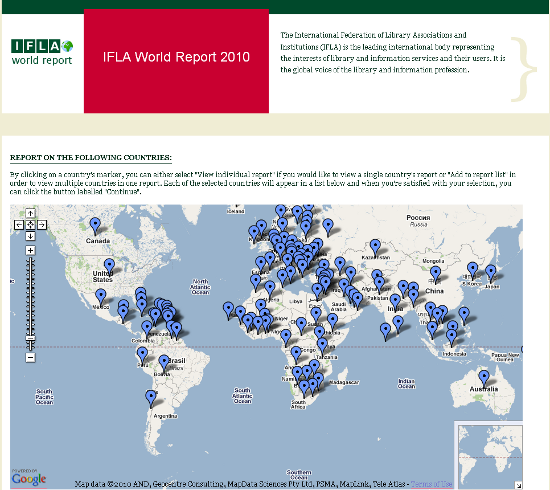
1) IFLA world library report – An interactive map showing all sorts of facts and figures about libraries in different countries.

2) ALIA Access blogging – coming soon to an Australian Library Blog near  you…. the ALIA Access 2010 library conference that is happening in Brisbane right now. You can check out the official conference blog, follow the conference on its own Twitter account @ALIAAccess , or search for the hashtag #aliaaccess .

3) ALIA Access #leftbehind Western Australian tweetup – a bunch of us who are enjoying the Perth rain instead of the Brisbane sunshine are getting together tomorrow night to discuss how we aren’t at ALIA Access and don’t need to be when we have each other’s wonderful company.  All librarianly types are welcome. It’s at 7pm tomorrow (Wednesday)  night at Chocolateria San Churro, Leederville. (This is red so people notice it before the tweetup. I may change it to something more seemly after the event).

4) HTML5 This new standard for HTML will allow web browsers to be told how to do backflips and jump thorough hoops that previously third party browser plug-ins handled. Check out what can be done with HTML5 in “The Wilderness Downtown “, an interactive film starring the streetscape where you grew up (if you put in that address at the start). It does lots of neat video tricks and you can check out the HTML5 canvas element when you get an opportunity to write a postcard to … well, you’ll have to watch the film to find that out…

5)  Positive Tweeting in September .  Kat Clancy, Library Web Developer at Deakin University, who gave a great presentation at last week’s VALA meeting about m-libraries had a bright idea last night. Following on from the  30 Posts in 30 Day blogfest in June and 1Pic1ThoughtinAug Flickrfest comes the #postiveSep positivityfest. The idea is simple – post one positive tweet each day in September and use the hashtag #positiveSep to identify it. Even if you are not doing the tweeting, just searching on the hashtag should make your day a bit brighter.

6)  Gmail priority inbox . Oh, look, I’m raving about some new gmail feature again. They just keep pumping them out and I just keep liking them. Coming in the next day or so is the Gmail Priority Inbox . It works like a reverse spam filter – learning which emails you open, answer, deal with as a priority and floating them to a special section at the top of your inbox. Nice. Hopefully it will work better than the newly-in-your-email google phone calls. Michael Arrington from Techcrunch is reporting that 75% of his outbound calls are failing since the service was opened up to all …

Yes, Google phone calls to the US for free works in Australia

Uncategorized

This morning, along with a lot of people in Australia, my gmail account came with a new feature, offering to let me make free phone calls to the US and Canada.

“Huh”, I thought, “dumb google marketers presume we are all in the US and Canada and have just added the notice to *everyone’s* account – bet it doesn’t work”…

BUT….

I opened the window, started entering a friend’s phone number – only to have it finished from my contacts lists – and bingo! – connected for free to a phone number in the US. The line (channel ?) quality was fine and the connection was fast with no dropouts. And it didn’t cost me a cent.

How quickly my thinking has changed. I didn’t think “gee, this is just like calling from my phone”, but “hey, just like Skype”…

Wonder how long before – if ever – I will be able to call within Australia for free. Right now it costs 2c per minute if I use this service … actually not too bad … And definitely what I would use when travelling overseas,  if for some reason Skype does not let me call home.

Proud mum … Broadband Innovation, Lego Club and Tim Winton

Uncategorized

… you can skip this post if you are here for the library tech. This one fits in the “balancing and being mum” bit of the blog tagline.

I’m insanely proud of my family this week.

BROADBAND INNOVATION AWARD

My husband, Stewart, was instrumental in developing  the software for discerning unusual patterns in video surveillance footage for the Icetana company, which grew out of his research group at Curtin University. Last week the company pitched to over 400+ potential investors, mentors, entrepreneurs and customers at the Tech 23 event in Sydney – and won $25 000 from the New South Wales Government for the “Broadband Innovation Award”.

(Of course, I can bring librarianship into this one – check out another one of the finalists – readcloud , which claims to be “the world’s first social ereading software”. It uses the ebook itself as the platform for social discussion about the book’s content. This Australian firm is not to be confused with Copia, which claims to be “the first social eReading experience designed so you can discover, connect and share what’s meaningful” – but they do this by integrating a website and a their own ereading device )

LEGO

Then today my Mr12 came second in his school’s Lego club “Science Fiction City” building competition. He instigated the group last year and it has been a source of many, many hours of joy for him and his mates at lunch times. The support teachers are in on the act and buy ridiculously attractive large Lego sets as prizes that whip the kids up into a frenzy of creativity. Mr12 let on that they have a “Greenhill Award” in the club for each term’s competition – for whoever “shows spirit and never gives up”.

WRITING

Libraries again… Last night Mr7 had his turn to shine. The family attended the Tim Winton Award for Young Writers’ Ceremony at Subiaco Library – complete with canapes and a string quartet. Mr7 was a finalist in the Junior Primary Category. In another show of great support from the kids’ school, the Head of Junior School attended to be there for Mr7.  The competition received 1634 entries in five categories. I was very, very proud when Mr7 was awarded Second Prize in his category for his story “North Goes on Holiday”. Mr7 was very, very thrilled to read the congratulations that were tweeted from my friends on Twitter and I’m not sure he’s stopped grinning yet…

Everything you wanted to know about ebooks in Australia

Uncategorized

…well, that was the advertising for the event on Wednesday….

I have updated and very much expanded my presentation about ebooks. This was for a Professional Development session for the Association of Independent Schools in Western Australia at  Hale School.

The slideset, handout and a movie of me delivering it are embedded below.

If you want to find some great practical tips about useful sites and applications from a voracious Australian ebook reader please check out the comment from Clytie on my previous post. She has been incredibly generous with her time by writing a very comprehensive comment that would be and excellent blog post in itself. In answer to your question about ebooks in Australian libraries, Clytie, I recently tried to make a comprehensive list over at librariesinteract.info:
Ebooks for loan in Australian public libraries – who’s doing it?

Topics covered in the presentation are:

  • History
  • Print vs audio vs ebook
  • Reading devices
  • Platforms and software
  • Formats
  • Content
  • Ebooks in libraries
  • Pushing it – ebooks beyond 2D text

Here is the slideset:

Here is the handout (saved as a document at slideshare, which gives it clickable links in the embed below – novel!)

Want Australian Kindle ebook content? Don’t be Australian.

Uncategorized

Are you Australian and want to read Tim Winton or John Marsden or Peter Carey using Kindle reader? Dream on.

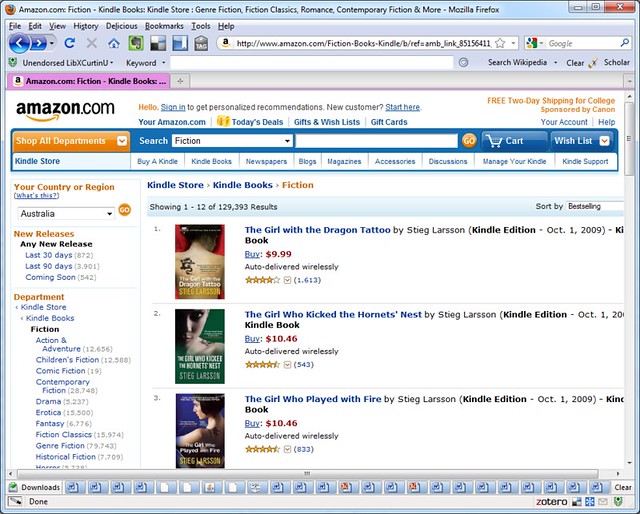
Last night I had a friend in the US take a screenshot of the Amazon.com Kindle Books Store at the same time as I took a screenshot in Australia. I wanted to compare the number of items available to people in the US with the number of items available to people in Australia. I created a set of screenshots at Flickr , Kindle Store: Australia vs USA if you want to see the screenshots below more clearly.

In Australia – you have access to 129, 393 works. But look at the New Releases – 3901 in the last 60 days.

In the USA, you have access to 197, 947 works … but  6361 New Releases in the last 60 days.

This means that while Australians have access to only aboout 65% of the Kindle ebook stock available to people in the US, when you look at recently published items, that drops to about 61%.

When I logged out of Amazon.com, I noticed that the sidebar now let me change my country or region (at the top right hand side). I did a few comparative searches. Tim Winton – no ebooks available in Australia, 4 ebooks available from the US. Peter Carey? One ebook for Australians (The Tax Inspector) with about 10 US ebooks.

Can someone please explain to me how these restrictions on getting Australian content in Australia helps Australian writers, readers or publishers? I’m a little slow at understanding how.

My favourite, though was with Australian Young Adult writer, John Marsden. 8 results for readers in the US. If you are a teen in Australia searching for your favourite author? You get this: