Booko.com.au – get print books for less in Australia

Uncategorized

I love local book stores and libraries. Browsing, pulling books from shelves, taking my choice home with me then and there…

But sometimes at 11pm I just want to order an obscure print title or technical book and have it delivered. The convenience of not having to find time for a physical visit  is worth paying for some days.  Sometimes I want to consume a book as an *experience* rather than as an object. If  it is not available as an ebook, then I want it delivered as soon as possible.  As an aside, I think that both libraries and bookshops will need to very quickly come to terms with this “experience vs artifact” desire – a point made very well by Emily Lloyd in ShelfCheck 423B

ShelfCheck 423b
By poesygalore | View this Toon at ToonDoo | Create your own Toon

Last year I mentioned to my friends  Penny and Con that I might try not to rely on local bookstores when buying books for the library, but instead order solely online and have them delivered. Suddenly they were excited and yelling – “Booko, Booko, try Booko”.

Just last week one of the students in my classes was recommending Booko to his classmates as a way to get cheaper text books, so I suspect that there are still some library folk who do not know about this tool.

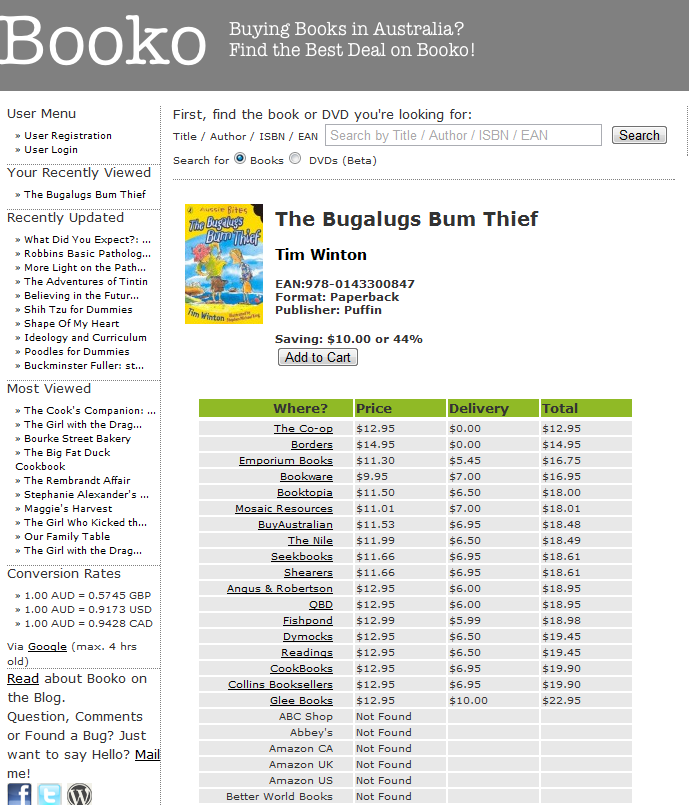
Dan Milne was sick of trying to work out the best prices for online books – especially when one took into consideration the exchange rate and the cost of shipping. That’s how Booko came about. Plug in details of the book you want and it dashes off to search several local and overseas shops to calculate the cheapest one.  Dan now gets a small “referrer fee” when one purchases an item as a result  of a link from Booko – but he doesn’t let it affect the search. I have found that sometimes the search (understandably) does not indicate whether the item is in stock at the store, so sometimes one has to click through to a few to get something cheap and available now, now, now…

Here’s a pic of what happened when I searched for Tim Winton’s Bugalugs Bum Thief:
Signing into google from multiple accounts in the same browser

Uncategorized

Shiny!

If you are like me, you may have too many online identities for your own good. I often want to swap between a vanilla-ish gmail account that I use for creating screencasts and a bells-and-whistles-all-my-email-redirected-here account that I use as my main workspace.

I used to have to have one account open in Chrome and one in Firefox to achieve this, but starting today, Google is rolling out the option to use multiple identities in the same browser. You just change a setting in your account settings and then you can select which account you are working with from a dropdown box in the top right of the screen in the place where your account name is usually displayed.

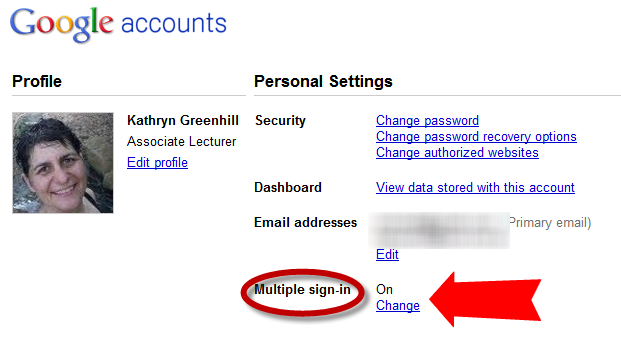
To check whether it is enabled for you, go to your google account settings. You will now have a “Multiple Sign In” option, like this:

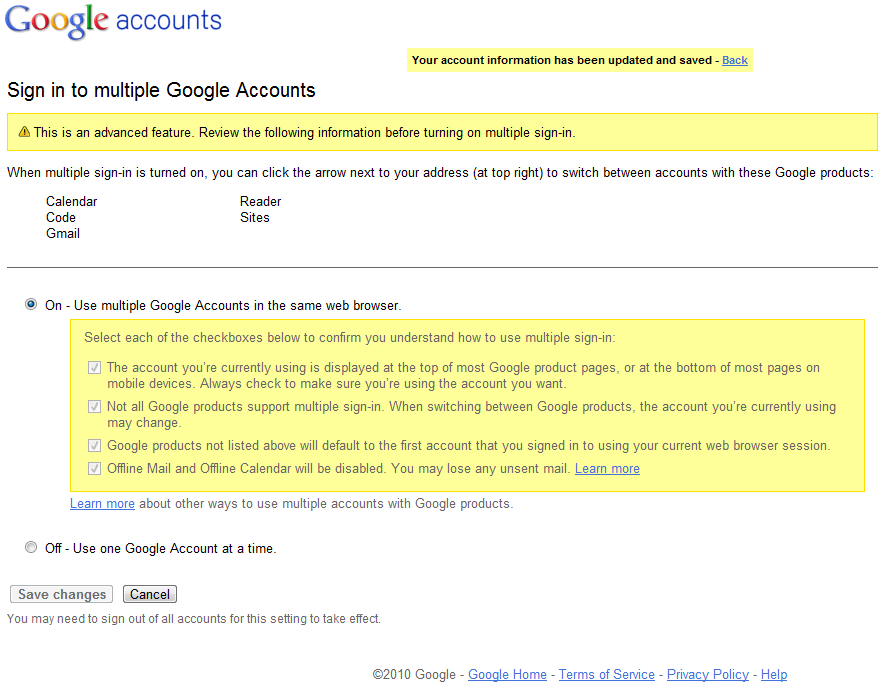
Then when you select the “Change” option, you will be asked to acknowledge four points about using the sign-in, and then you are away…

Thank you Yarnbrarains !

Uncategorized

Many librarians have cats. Many librarians knit and crochet. Life facts that we should all accept – and celebrate.

Just check out the Flickr search for “Librarians Knitting” and scroll through the pages to see what I mean.

Look around at your library next conference, even in classes at university, and the needles are flicking. I’ve been in several unconference sessions where social networking is being discussed and someone eventually shuffles to their feet to say “Well, I’m a member of this amazing network for knitters and crocheters called Ravelry“, to be met with a few heads snap-turning in their direction and a chorus of “oh – me tooo”….and then all talk of librarianship melts into the ether….

If you want a geeky treat, check out current VALA president, Kim Tairi’s Flickr stream of amazing amigurumi, especially the Spuffy and Doctor and Amy Pond sets. I think my favourite is Bunny winks then shoots you – DEAD :

Ryan Deschamps even shows how knitting is a skill that can be used for librarianship. To attract the attention of passers-by in Halifax, Nova Scotia, in June he and a group of other knitters created a Yarnbomb and  wrapped it around a tree. They attached publicity material asking for the community’s vision for their new library – Public Tree Yarn Wrap.

Knitting and crocheting librarians are also generous souls. How else can I explain the appearance in my life of an alpaca (?) wool Toque that Ryan knitted for me  on the way to Computers in Libraries last year. Or the purple handwarmers that Kate made for me before she left for Melbourne. Or the wonderful package of goodies sent by Cindi last week as a congratulations for finishing my degree and starting a new job.

Thank you Yarnbrarians. I was going to wish that you ravel long and prosper – but looks like ravel means “pull apart” (so is almost the same as unravel?)…. Anyhow, please know that your continued creativity creates bright spots in my days.

Library Day in the Life in Five Minutes

Uncategorized

I’ve been at Curtin University for a week and a half now. The students are back next Monday. As part of the Library Day in the Life project, here is a 5 minute video post about what my day was like – Library Day in the Life in Five Minutes.

At about the three minute point, I take you on a tour of my whiteboard and my office….

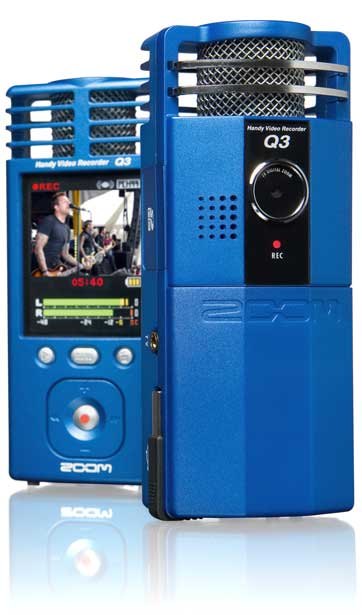
I am hoping to make a weekly “hi there, have you thought about *this*” video for my students. All the students in one unit and about two thirds in the other are studying online only, so I hope that a video will make me seem less faceless. I have bought a Zoom Q3 Handyshare to make the videos. It has studio-quality audio with the added bonus of a video attached – with about the video quality of a Flip camera. It looks like this:

What you don’t see in this clip is the twenty others I made before with such thrilling content as:

  • “This is with the window behind me and the overhead light on”;
  • “This is on the rounded end of my desk, with the desk lamp on and the overhead light off”;
  • “This is up against the back wall of my office with all light sources and the camera on a filing cabinet”

– as I tried to find a light source that made me look human and not like a kidnapper.

It would have been even better if I wore a white shirt and used some of the other tips and tricks in the article that first made it all click for me about how lighting worked with video cameras – How to Improve Your Cheapo Webcam’s Picture Quality

Not a paperless office…

Uncategorized

I’ve been working at Curtin University for a week now.

On my way from the carpark on my first day, I tweeted that I had just heard a segment about the whether the  “paperless office” fulfilled its promise on ABC Radio National’s Future Tense .  In response, Michael Rees from Bond University shared that night his experience with cleaning out 19 years worth of contents in his university office, A Major Step Closer to a Paperless Office. He discarded…

…About 8 bookshelf metres of conference proceedings, box files and the usual stuff in ring binders including lots of overhead slides from the 1970s and 1980s all bit the dust. 9 full filing cabinet drawers were reduced to 0.25 of a drawer – that was all I had actually looked at in the last 12 months. 23 old conference bags were reduced to 2. Out of over 100 optical disks about 3 survived. I kept 1 USB headset/mic and discarded a dozen or more old analogue headsets, mics and speakers. It feels wonderful. [For those wondering I discarded all my printed journals 2 or 3 years ago.]


Consequently I don’t feel too bad about the inheritance that will share my space until we move buildings at the end of the year. It’s a decade worth of the Tuesday IT Section of the Australian newspaper. Only half of the collection fit into the photo.

I was asked whether I wanted to continue adding to the collection. “Why not”, I thought, “obviously it was valued and it would be a pity to stop it now”. For about 5 seconds… before I asked myself whether I would have chosen it as essential for my office if it wasn’t there already…

New theme. Bit too much?

Uncategorized

I’ve been on holidays, so I fiddled about with making Suffusion the theme for this blog.

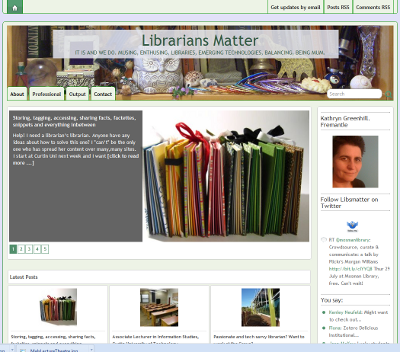
I used the Featured Content option. In the Reading option in Settings, I set the home page to be a page that uses the Magazine template.

Of course, I am wondering whether the home page is a bit overdone. If you have an opinion about any of the questions below, please let me know.

  • Do you think the rotating content is a bit too much?
  • The refresh rate too fast?
  • The blog a little too slow to load now?
  • Does it look less friendly and like a place to have a chat?
  • Do you notice the RSS feed options and do they take up too much screen real estate?
  • Would you prefer the output of a search in the search box to be a list of blog post titles, or the little excerpt boxes as appear on the front page at the moment?

Storing, tagging, accessing, sharing facts, factettes, snippets and everything inbetween

Uncategorized

Help! I need a librarian’s librarian. Anyone have any ideas about how to solve this one?

I *can’t* be the only one who has spread her content over many,many sites.

I start at Curtin Uni next week and I want to:

  • keep my academic references / papers / thoughts and jottings in order and accessible and sharable.
  • be able to tag, store and retrieve them at the flick of a button and without interrupting my everyday workflow. (Don’t we all ? 🙂 )
  • have a place that I can flick references/readings that I want students to look at.. possibly with annotation (Tumblr? Delicious?)
  • have an online portfolio/repository of my own writings/audio of presentations that I can link to when people ask about them

I am toying with starting a “Kathryn as an academic” blog … mainly so I can use all sorts of tools but have a single place to pull in the feeds from the tools, and then point people that I want to share with to just the one spot… (Or maybe I should start a separate friendfeed account for that ?)

Currently I use:

  • A Zotero account for my “personal and scholarly” citations (for papers I am writing etc). Synced via Firefox on my own PCs and at Zotero on the web
  • A Delicious account for my “non-scholarly and want to share” bookmarks (like WordPress hacks). Not backed up.
  • Evernote for my personal jottings, screenshots and crap. Synced on my own PCs, iThings and the web.
  • Dropbox as a backup for whatever I am writing, a place to pop pdfs I want to read on my iThings and for sharing co-created works while they are being made. Synced between my PCs and the web.
  • Instapaper to save readings that are pushed out in Twitter that I want to find later and read on my iThings. Not backed up.
  • My Slideshare account for the public face of my presentations, plus audio on my own webserver if it is a screencast. Presentations backed up on my PCs. Synchronised slidecasts not backed up.
  • The c: drive on my PC for pdfs of professional reading that I have saved to Zotero.
  • Goodreader now that I have my ipad for reading long pdfs. Downloaded by emailing them to myself) Only on my iPad and gmail
  • LibrariansMatter.com for my blogging and KathrynGreenhill.com as a kind of professional portfolio. Backed up regularly.
  • Twitter as Libsmatter where I push out things that I would otherwise blog here. Not backed up.
  • I also have a YouTube account and a Flickr account that has a mixture of personal and professional. Originals on PCs

I seem to have a lot of places where I am storing full text, so I intend to investigate Omeka as a way of creating my own repository, or maybe Kete or Drupal…although I do not want a huge rigmarole to store and upload files. I know there is a great Zotero/Omeka plugin.

I’m trying to set up a really sensible structure from Day 1 …but with so many tools I think I must be being really inefficient. It doesn’t bother me so much to use so many, I just feel really “unlibrarianly” and not very analytic to be doing so. Maybe that is just the nature of the beast- all do what they do very, very well..

I am curious about whether anyone else has solved this kind of problem in a more elegant way…

Associate Lecturer in Information Studies, Curtin University of Technology

Uncategorized

Yep, I just signed the contract and handed all my paperwork into Human Resources.

I’m starting the position as Associate Lecturer in Information Studies at Curtin University of Technology on 15 July, teaching the unit about Information Management Technologies and also the Public Librarianship unit.

IMG_0835 uploaded to Flickr by Mal Booth

I take a week off with the kids on school holidays next week, spend two more days at the Grove, then start at Curtin the next day…The students arrive about two weeks after I start.

If you are in my network and are a student or a library school teacher or a librarian with an idea about what should be taught, I will probably be calling on you for mentorship as I find my feet in the next six months or so..

I would love to know your best bit of advice you can give to someone teaching library school students, online and blended online/internal teaching, changing to a new sector or balancing work and family … any and all ideas gratefully accepted….

Passionate and tech savvy librarian? Want to work at the Grove?

Uncategorized

I am leaving the Grove before we move into our fantastic new building in August … more about that in my next post.

But if you have:

…and would like to be part of shaping it all and add your own touch, then you should apply.

The Grove. Leading, learning, living. Site visit May 2010 uploaded to Flickr by thegrovelibrary

The position will be advertised in the West Australian this weekend and an information package has just been sent out on WAIN, the Western Australian library list. Applications close on 19 July 2010.

Here is a bit more information:

e-Services Librarian – Full Time

An exciting opportunity is being offered to an enthusiastic and creative professional interested in sharing in the challenges of providing a “state of the art” library service to the Cottesloe, Peppermint Grove and Mosman Park communities.

The successful applicant will be responsible for driving and managing all the technology initiatives and the library’s online presence within this new and innovative library environment.

We will be looking for a person who has the technical and communications skills to implement our Digital Strategy.

The salary range is $61,173 – $65,731 depending on experience and a superannuation package up to 16% is available.

Applications close Monday 19 July 2010.

Contact: Tricia Hille on 9385 3233 or thille at  thegrovelibrary.com