Podcast: What our library is doing with Second Life

Uncategorized

I made my second-ever podcast last week when Jo Kay asked me to take part in a showcase within Second Life, featuring what Australasian education projects in Second Life. I knew I’d be on holidays on 20 June 4pm – 5:30pm W.A. time, so my presentation will be streamed into SL to a screen on Wasp, where the showcase will be held. (SLURL: http://slurl.com/secondlife/Wasp/41/74/82/)

In it, I outline why Murdoch University Library has a plot of land in Second Life and how we are using it to help our community understand more about education in a Multi-User Virtual Environment.

You can find out more information about the event at Jo and Sean’s wiki, In-World Presentation: Showcasing Australasian Educational Projects in Second Life . I’m sorry to be missing it, because it looks like a very interesting lineup. Here’s a rough timetable as at 15 June 2007

* Sean FitzGerald (Sean McDunnough) – Introduction & Overview – 6.00pm – 6.10pm
* Jo Kay (jokay Wollongong) – Sean & Jo’s Projects – 6.10pm – 6.20pm
* Malcolm Jolly (GippsTAFE Gonzales) & Glenda McPherson (Glenda Arrow) – The GippsTAFE Project – 6.20pm – 6.30pm
* Kathryn Greenhill (Emerald Dumont) – Murdoch University Library Discovers a Second Life (video) – 6.30pm – 6.40pm
* Aaron Griffiths (Isa Goodman) – SL Educational Projects in NZ – 6.40pm – 6.50pm
* Gary Hayes (Gary Hazlitt) – AFTRS & LAMP (video) – 6.50pm – 7.00pm
* Lindy McKeown (Decka Mah) – Terra Incognita – 7.00pm – 7.10pm
* Alan Levine (CDB Barkley) – New Medium Consortium and Aussie Trip – 7.10pm – 7.20pm
* Jo Kay (jokay Wollongong) – Wrap-up – 7.20pm – 7.30pm

Here’s a slightly longer version that I uploaded to YouTube: Murdoch University Library gets a Second Life:

Flown the coop

Uncategorized

Dear Reader, By the time you read this, I will be far above the clouds on my way to Broome for a week’s break.

Cable Beach sunset


Cable Beach Sunset uploaded to Flickr.com on December 27, 2005 by marj k

I haven’t taken a PC, but will probably check my email a couple of times on public access PCs.

Atop a camel, I shall think of my children back home with their grandmother. Sea kayaking, I will think of my workmates. Maybe, just maybe, as I watch the sun going down on an endless beach, I’ll think of you – dear reader.

Working with the users’ tools

Uncategorized

Like Mr Stephen Fry, many users have several “home pages” that they go to every time they open their browsers. Chances are that for most of our users, our library web site is not among them.

As a very nice student politely told me, when most of them access our library site, they do not come through our home page and then take the carefully crafted and orderly route we’ve crafted for them – they bookmark the “databases” and the “catalogue search” page and only ever use these.

Many people use a web browser and some kind of portal/personal home page ( iGoogle, Facebook, Netvibes) as a starting point these days. What if libraries worked with our users to give them the tools to use our library resources without leaving these familiar home pages? Well, the tools below do just that…and many of them allow your library to join in so your own users can play too…

1) LibX – A Firefox extension for libraries

Created by Virginia Tech, LibX allows you to search the holdings of your library and much, much more, straight from your browser. I was going to summarise its features, but it’s packed full of such goodness that I’ve used the description from their site:

  • Toolbar & right-click context menu: Direct access to the catalog via a toolbar and context (right-click) menu – automatic construction of simple or advanced searches. Search by entering terms, select and right-click, or select and drag-and-drop without having to navigate to the library catalog page. LibX supports Millennium, Voyager, Aleph, Sirsi, Dynix/IPAC, and user-defined catalogs.
  • Adaptive context menus: The context menu changes automatically depending on what is selected. For instance, if an ISBN is selected, the context menu will offer the option to search directly using that specific identifier. Currently recognized are CrossRef DOIs, ISBNs, and ISSNs, and PubMed IDs.
  • OpenURL support: OpenURL is a standard that helps your library get you to appropriate resources, including the full text of journals to which it subscribes. LibX gives direct access to your institution’s OpenURL resolver, which can directly point you at the full text of an article you are looking for. (OpenURL resolvers are often called “Find it@”, “Article Finder”, “Article Linker”, “WebBridge”, “Get it@”, “Find Fulltext”, “Article Express” or similar names.) OpenURL can work well in connection with Google Scholar.
  • Google Scholar Support (The ‘Magic Button’): Select text and search for the selected text on Google Scholar. In addition, LibX will read Scholar’s results for you, determine whether the paper was found and if so, ask the OpenURL resolver for a paid-for copy, should you not have access to the copy to which Scholar links. You can use this feature even from inside a PDF, which makes retrieving papers referenced in a PDF file a snap.
    If your library has not subscribed to Scholar’s services, see Question 11 in the FAQ: Can I get the Google Scholar search to work even if my institution has not registered with Google?
  • Web Localization via Embedded Cues: LibX places localized cues in web pages you visit if the library has resources related to that page. Whenever you see the cue, click on the link to look at what the library has to offer. For instance, book pages at Amazon or Barnes & Noble contain cues that can check whether the library has the book you are looking to buy. Other pages that contain cues are Google, Yahoo! Search, the NY Times Book Review, and others. See the screencasts in Demo 3 for examples of this cool feature.
  • Autolinking: Based on Jesse Ruderman’s autolinking script, LibX automatically links ISBNs, ISSNs, DOIs, and other identifiers to the catalog or OpenURL resolver.
  • Off-campus access via EZProxy or WAM: Support for off-campus access to licensed resources, if your institution uses EZ Proxy or III’s WAM. You may reload a page through the proxy, or follow a link via the proxy, making it appear as though you are coming from an on-campus computer. This features gives you access to resources to which only on-campus users have access.
  • Support for COinS: LibX supports COinS, which can turn hidden tags inserted by web site authors or publishers into actionable OpenURLs links that allow a user to download the full text of an item. More information on COinS.
  • Support for xISBN: Support for OCLC’s xISBN: find a book, given an ISBN, even if the library holds this book under a different ISBN.

2) A Library specific Toolbar for Firefox

If LibX doesn’t suit your library, you could create from scratch a Firefox toolbar for your users to download and install. You could put in a search box or RSS feeds, a chat box or bookmarks to useful sites.

Guus van den Brekel from the University Medical Centre library in Groningen has created a slideshow about library specific toolbars – how to make them and why – The Library Toolbar in Detail. This tutorial from Jonah Bishop at Born Geek is a very good detailed starting point: Firefox Toolbar Tutorial.

3) A google widget for the google home page

You could use google widgets to create a search box for your library, then offer your users the code so they could embed it in their iGoogle page.

The University Of Western Australia has a nice example of this, on their Library Catalogue Tools page.

4) An OpenSearch plugin

You can give your users a plugin that adds your library as an option in the drop down search box at the top right of their Firefox or IE7 browser.

Here’s an example that one of our IT guys made for my library at Murdoch University, Murdoch Catalogue plugin.

5) Facebook catalogue search widget

Now that Facebook allows external applications, and it may be useful as a portal, you could create an specifically for your library, like this one from . This Facebook applicaton from library at the University of Illinois at Urbana-Champain adds a small widget to your Facebook page, allowing you to search the catalogue and chat with an online librarian. David Ward has released the code he used to make it, and it has already been copied by to make a Facebook ap for Hennepin Public Library.

6) LibGuides Facebook application

This is a paid service from Springshare that

enables you to access the content from your library inside of facebook. Read your course-related library Guides, get research help, chat with reference librarians, or search the library catalog using LibGuides.

I’m a bit wary of something you need to pay for when you can make it for free, but for libraries without developers (ie. most of us) this may be an option. You can find information on the Facebook Libguides page.

7) Embed code for catalogue searchbox on MySpace

You could provide users with a paragraph of code that they could use to embed on their home page – particularly useful for MySpace Users . Morris Library at Southern Illinois University, Cabondale provides this for their users (as well as a LibX download) on their Library Downloads page.

While these types of services won’t be useful for all our users, and will be unintelligible for many, we should know how to create them now, so that we can provide quality service to our early adopters.

Random 8 – Too much Code Monkey on YouTube

Uncategorized

Random thing 8 from the list I made last Thursday:

8. My secret vice at the moment is watching YouTube clips that people have made of Johnathon Coulton’s Code Monkey – like:

Now to tag eight folk with the “Random Eight” meme – tradtionally done as just one post. If you don’t “do” memes, just turn the other way:

Random 4 – 7 – oddsbodkins

Uncategorized

Random things 4-7 from the list I made last Thursday:

4. I’m wearing a rainbow coloured hat that looks like a teacosy but keeps my head warm.

5. I’m extrememly shy when the situation calls for social chit chat….I’m a real “kitchen at parties” person, who would rather help out with things that need doing than stand around and make conversation about things that mean nothing to me. (If I care about ithe topic however…). I love to dance at parties and will probably be the third on the dance floor at most gatherings – after the first one , the pioneer, and the second one – who gets up to confirm the first one isn’t a dork.

6. On Tuesday 29th May I had been an orphan for exactly two years.

7. I have 5 pairs of crocs sandals in black, red, blue, purple and pink. Three are fake K-Mart ones. I am very thankful to work in a library where I can wear them.

[…to be continued…almost done…..don’t like this pre-written blogpost idea…..]

History of the Whole World: Do Not Want.

Uncategorized

At work, I spend my time identifying changes to the information landscape and how they will impact on librarianship.

This afternoon while I waited for Mr4 at swimming lessons, I still managed to be stunned by a casual conversation with another couple of mums. It really brought home to me how much information is available to the average person, and how savvy they are becoming.

I don’t think mummy-chat in the 1980s was like this.

Mum 1: What’s that in your bag?

Mum 2: Oh, it’s just a CD of “The History of the Whole World”, they are giving them away with the Sunday Paper.

Mum1: Oh yes.

Mum 2: I’ve been picking it up in the supermarket when I get the paper, but I’m not really sure why…

Mum 1: Oh?

Mum 2: Yeah. It says here that it’s for over 9’s and my two are under five. By the time they are that old, it will all be out of date.

In case you didn’t pick it up – it was the history of the entire freakin’ world….with a Sunday Paper…..full multimedia….but rejected because it would be out of date within 4 years.

I think Mum2 made the right call, but did anyone else grow up in a household where your parents carefully paid the monthly account so they could provide you with a set of World Book Encyclopedia or Encyclopedia Britannica to last your entire school years?

(Changing the topic totally…I’ve been translated. If you visit this link, Razones buenas (y malas) para estar en Second Life, you’ll see the Spanish version of my Ten Very Good Reasons Why Your Librarians should be in Second Life and Six Very Bad Reasons to have a Library Branch in Second Life. Thanks Mixolidius. I know, I should be cool about it… pretend it happens every day….)

Random 3 – My goals

Uncategorized

Random thing 3 from the list I made on Thursday:

3. My goals at the moment are:

  1. To stop interrupting people when they are talking
  2. To find the strategic few points in any situation and communicate them, instead of EVERTHING
  3. To reconnect with my husband after several years of our kids’ needs and my parents’ needs draining our energy
  4. To exercise more and eat fewer marshmellows
  5. To regularly get more than 5-6 hr sleep a night.
  6. To do a perfect butterfly with my contact juggling ball
  7. To work out how to say “no” to interesting things when I really don’t have time for them
  8. To find in housework the Zen place that monks go to when they chop wood.

[…to be continued…]

How to create a podcast using Audacity

Uncategorized

I want to know how to create a podcast. Here’s my first attempt at using Audacity to create the audio file. It’s a two minute explanation of the objects in the top image of my blog.

This is not technically a podcast, as it is not part of a series delivered via a feed. To quote Wikipedia, “a podcast is a collection of files (usually audio and video) residing at a unique web feed address”.

Click here to hear it:

librariansmatterimage.mp3

header.jpg

Here’s what I learned:

1. Here’s where you can download Audacity .

2. You’ll find very detailed step-by-step instructions in how to use Audacity in this podcast from Sue Waters: Tips for creating audio podcasts using Audacity

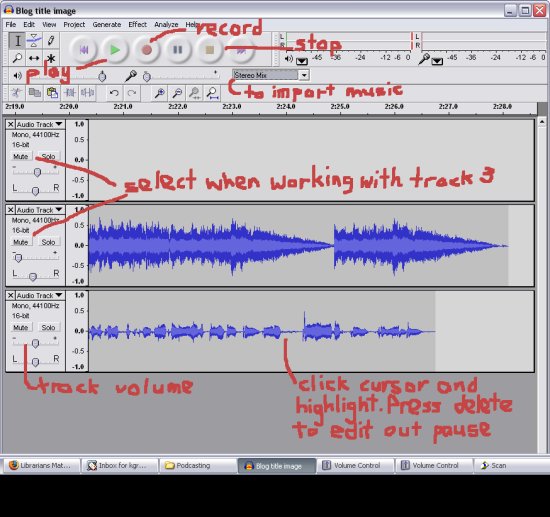
3. Here’s an image showing the basic functions.

smallaudacitynotes1.jpg

4. Style. Decide whether you want:

  • To write a tight script and pleasantly read it like a newsreader
  • Talk with another person “interview style”. This tends to be the most engaging way.
  • To decide the key points you want to get across and then just talk. This is what I did above and with the screencast I did for Five Weeks to a Social Library. You can always cut out the rabbitting-on bits, so I just pause when I make an error and repeat what I should have said. Editing magic does the rest.

5. Background music.

  1. I used jamendo which has downloadable music released under Creative Commons license. Often you will only have to attribute the author and agree to release your work under the same license – which may mean giving others permission re-use and alter your audio file.
  2. At the site, it looks like you have to download the entire album, but you can import the track straight into Audacity. Drop down the “Stereo mix” button (see image above), then press record and start the track playing in the other window.

6. Export it as an MP3 when you are done.

My next step is to add images using Windows Movie Maker…to make it ready as an enhanced podcast…then work out where I’d upload it and how I’d make a feed for a series of them….manyana…

We had coffee with that…

Uncategorized

Nine of us turned up to the Library 2.0 chat at X-Wray on Saturday – me, Con, Hoi, Rachel, Sue, Matthias, Emma, Maeve and Kit. It was a great venue – with yummy food, comfy couches and tables to work on, no stencils in cinnamon on their chai lattes and without background noise so we could hear each other.

We eventually got the wireless working for Matthias’ tablet and spent some time seriously examining the important current trend in librarianship that is lolcats. And lolbrarians. And the automatically generated lolcats images from any RSS feed – like this one from my blog.

lolcats.jpg

Although we were from different sectors – all but school libraries – we had a lot in common. We all had colleagues who didn’t “get” Library2.0 and some who said they did, but only wanted to learn about new tools in work time when the rest of their “real work” was done.

We discussed Library 2.0 learning programs and podcasting. We discussed what would happen if we downloaded the free Open Source podcast creation program, Audacity, in our libraries. There was such a range:

  • one of us was totally locked down from any software not controlled by central IT
  • one had the blessing of IT,
  • one of us thought an “ask for forgiveness not permission” stance would be tolerated
  • one would have to put it to a committee that met every three months to consider what gets added to the Standard Operating Environment – but could probably get an approved but very expensive program installed within a day
  • one who had just come from a restrictive environment almost fell off her chair when the IT at her new job answered a request like this by just giving her admin rights to her PC

We created a page for our bunch on the Library Society of the World wiki.

I’d like to get together again. Sue and Con and I have already been e-muttering about getting together sometime to talk about David Weinberger’s Everything is Miscellaneous. (Here’s a great review buy Karen G Schneider ). Saturday afternoons suit me.

Random 2 – blogs that make me think

Uncategorized

Random thing 2 from the list I made on Thursday:

2. Five blogs that make me think are:

  • Danah Boyd’s Apophenia where she discusses youth culture, identity and social networking
  • John Blyberg’s blyberg.net where he showcases some cool gadgetry but I hang round for the sharp-as-a-tack and gentle-as-a-lamb direct hits he can make on the foibles of our profession
  • Sue Waters’ Mobile Technology in TAFE. She makes enhanced podcasts with local educators who use new technology.

The following two make me think in that “crinkle my brow and see whether I know enough techie-talk to follow what they are saying because I know it will be rewarding” way:

  • Panlibus from the guys at Talis
  • PT’s Outing from Peter Sefton who is working on the RUBRIC program and ICE at the University of Southern Queensland

[…to be continued…]

UPDATE: 3 June 2007: Sue Waters’ blog is actually broader than my description – she “ will interview any one, any where, in the world on anything relating to technology”.