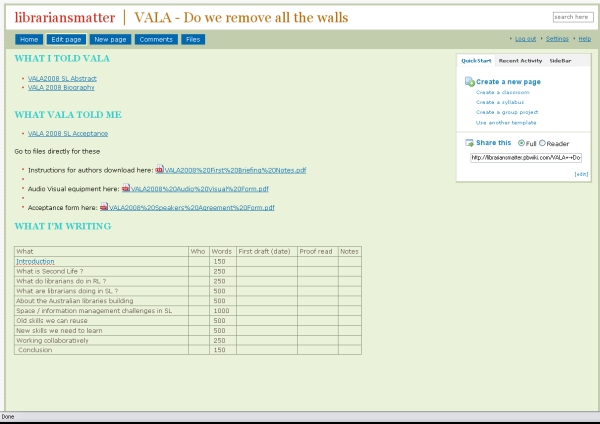
Thali tags

Uncategorized

I like it when people work on projects for fun and produce beautiful things.

Corey, who is one of my co-conspirators in librariesinteract.info, yesterday launched thali tags.
thalitags.jpg

Thali tags is a tag cloud built from the most novel terms from posts in the personal blogs of the mob (the thali ) who look after lint. Blogs indexed are:

Corey explains the process in more detail in his blog. It involves scrunching the feeds up, forcing them through a Yahoo Pipe for some content analysis and then spitting them out into a tag cloud.

You can click on each tag and see the blog posts that they are from. I read all these blogs and I would have said that there was very little overlap. Now I see that over time, we often blog about the same thing, but from very different angles.

It came from one of those idle gmail chats we were having about some less exciting aspect of administering lint months ago. “Hey Corey, Dave Pattern has done this with a whole bunch of international blogs, wouldn’t it be cool if we had something like this for lint “. And then off he went, did some tinkering and produced the thali tags. Wish I could do stuff like that, but I guess I’m happy to be cheerleader.

I’ve really enjoyed watching the thali work together with this. Corey would tweak the tags a bit more, show it to the rest of us and then we’d give him feedback, or encouragement. It’s given the rest of us a better understanding of how the tags work and provided Corey with a sounding board as he went.

By the way, things might get a little quieter here in the next month or so. I have a few family camping weekends plus Mr4’s “whole-class-and-a-visit-from-Fireman-Kev-and-his-firetruck” fifth birthday party coming up. And MPOW launches a 23 Things program in 2 weeks, and it looks like our uni will have more Second Life activity soon, and then there are those VALA papers that need to be written if I want to pop across Australia and hang out with some very interesting folk in February. Last time I said I would be blogging less, I think ended up blogging more – maybe it acts as stress relief.

Why libraries should care about mobile phones

Uncategorized

What do your library users use more often, their PC connected to broadband or their mobile phone? What do more of them own? What do more young people have exclusively for their own use – a mobile phone or a PC?

According to the Australian Bureau of Statistics, in March 2007, 67% of Australian household internet subscribers had broadband, up from 59% in September 2006. (8153.0 – Internet Activity, Australia, Mar 2007 )

Mobile phones? The Impact of the Mobile Phone on Work/Life Balance Preliminary Report June 2007 conducted by the Australian Mobile Telecommunications Association and the Australian National University looked at how mobile phones have been integrated into Australian lives. It looks like most of the 1000 respondents were recruited online, so this may skew the sample a bit, however the study found that:

More than 88% of individuals own at least one mobile phone, 10% have two phones, while few (1.4%) have more than two. Moreover, two-thirds have owned a mobile phone for more than 5 years.
…
Among 14 to 17 year olds, only 12% do not regularly use a mobile. Mobile phone use peaks in the age range 18 to 39 years, where 94% regularly use a phone, and falls to a lower level among mid-aged adults (85%). The lowest number of regular users (73%) of mobile phones is found among those aged 60 years or more.

I was initially surprised by the lower uptake of mobile broadband services:

There is a very high awareness of mobile broadband (3G), with 86% of males and 73% of females saying that they are aware of the technology. A topic for further investigation is why the take-up of the new functionalities of the mobile phone has lagged so far behind the availability of the technology. Obvious candidate factors for exploration are consumer tastes, the age of handsets in use and pricing regimes, relative to other modes of accessing similar services.

I don’t know about you, but in the last 6 weeks or so, Web2.0 seems to have hit the mainstream in a rather big way – with people who once ignored it, or claimed not to care, suddenly asking me the types of questions I’ve been waiting for them to ask for over a year. It think libraries need to be prepared for a rapid upswing of users who want to get information from our sites via their mobile.

So – how shouldn’t we do it? Well, Nick Cowie, who is a fellow library worker in Western Australia, took a hilarious three minute look at what a mobile user sees when they access websites created by a few local web developers and some bigger fish who should know better – including the makers of his own mobile phone.

The clip, Why You Should Build Mobile Specific Websites for Mobile Devices, was created by Sue Waters, using Nick’s original slides and audio recorded by the Co-Pilot at Webjam.

By the way, what are we saying about our understanding of our users’ lives when we plaster our libraries with “please switch off your mobile phones” signs? Yes, if people talk loudly and obnoxiously on mobile phones they will annoy other people – but surely we can file it under “manners” – like we do with face to face conversations – and get on with our lives ?

Clever Co-Pilot drinks the koolaid

Uncategorized

The Co-Pilot is one of two finalists for Western Australian Inventor of the Year 2007 in the Early Stage category. I’m very proud. He’s very low key.

His team has already won something, although I’ve never quite seen a prize schedule so complicated. He’ll know the result on 19th October. This ad was on p38 of our Saturday paper (the West Australian).

invyearsmall2.JPG

The project is Virtual Observer. There are cameras on buses in central Perth that take footage out their front windows. Things happen in Perth that the cameras see. Co-Pilot writes programs to index what is on the videos – so people don’t have to watch hours of footage to find notable events. He has set it up so that you can specify a place and time and see what any of the buses saw at that time – for example what the traffic was like at a particular intersection between 3 and 4 pm from the point of view of several different buses. Or maybe trace the path of a lost child.

His viddler clip of the Perth Webjam winner, ICCARUS was the viddler featured video last Friday and got over 1000 hits . I think he’s realised that there are some times when it is useful to have a site that lets people know more about you.

He’s finally drinking the blog koolaid and has spent the last couple of days registering a domain, crafting a blog and populating it with posts. Finally he decided on A Different Tune: Stewart Greenhill on life, music and the art of science.

There’s a link to videos of six presentations at Perth Webjam and he’ll be adding Perth Barcamp ones soon. If you are interested in audio cassette surgery, it’s the place. There’s a nifty post about how to use autostitch to automatically insert still images into a panorama. There’s also a description of how to use autostitch to automatically drop video into the right place in a previously recorded video clip – watch the video clip where he turns the little bouncing kid sideways but the program still puts it in the right spot in the video. They are work things, but feature a very cute little boy in a karate outfit and another one dancing on furniture.

Leisure Reading Collections in academic libraries

Uncategorized

Facebook lets you install all sorts of third party applications. So far I am half way through a game of scrabble with one Facebook friend, have accidentally zombie bitten an overseas University Librarian, deliberately drawn grafitti on someone’s wall, laughed at my daily unshelved cartoon and have thrown virtual food at friends.

I like the “Question” application. It lets me ask a question that then appears in my friends newsstreams. My last question produced such, well – right- answers that I’m sharing them. I have permission from the contributors.

The question was:

Should we have leisure reading collections in academic libraries?

Here’s the answers:

Why not?

Yes! The academic library I used to work in had one. It was popular.

Definitely yes, subject to space and budget. We shouldn’t be as general as a public library, but if there’s something we think a good portion of our particular users would appreciate, that should be ok.

Sure! Students have some leisure time, why shouldn’t they spend it reading? Also, it’s a good way to draw staff into the library.

I can’t imagine a leisuire activity that isn’t up for critical analysis, so of course we should! 🙂

Yep! MPOW has a popular reading collection, that features on the holds list quite frequently. We have a lot of international students living on campus or very close by and the Library is not just used for study, but as their “family” room.

There is no such thing as pure leisure reading I think – everything can spark off a thought, reflection, or new discovery. If space permits, then by all means.

Absolutely! Everyone needs leisure reading and for many their academic library is the only library they access.

One person’s academic treatise is another person’s leisure reading.

Webjam Perth

Uncategorized

Great night. Professional, fun, great learning experience, real social networking.

Everyone had 3 minutes to present an idea. Topics were:

  • Self coded email client
  • Co-working space at the Silicon Beach House
  • Self coded photosharing site
  • Selected sites displayed on the mobile web – or why you should write a mobile specific site
  • An SMS information support system to help farmers use water more efficiently
  • How to optimise a site that suddenly gets more than 2 million hits in a couple of days (cache, cache, cache)
  • Using vectors to display True Type fonts on web pages
  • A node linked resume
  • LOLcode
  • Why get a web planner?
  • Web 3.0 – NOT. How to build a badly designed webpage from scratch.
  • How a web hussy uses web tools
  • ICCARUS – Spatial representation of nodes and interlinking in the social networking on Scouta

Voting via sending SMS of the speaker’s number. Cute animation showed the number of votes, but not who for, in the break before the winner was announced. It had the feel of an open mic comedy gig, but without the heckling.

Richard Giles and Simon Wittber from Scouta got the most votes, with their ICCARUS presentation. The video of it is here: Webjam/Perth: ICCARUS . Nick Cowie was second with what was described as “web-sledging” – where he chose the websites of people in the room and showed how they looked on a mobile device. Gary Barber, came third. He felt sick of the Web 2.0 look of his blog, so redesigned it as we watched – complete with non-scrapable text, flashing icons, music playing, tables everywhere etc.

The Co-Pilot filmed the event and will upload the other clips of each presentation to viddler soon.

Here’s what the best dressed were wearing. Mosaic of the geek shirts at Webjam Perth 15 Aug 2007. It’s clearer on flickr.

1. Maybe if this shirt is witty enough someone will finally love me, 2. Do not want!, 3. in case of emergency BREAK DANCE, 4. Webjam, 5. ALL YOUR BASE ARE BELONG TO US, 6. port80, 7. Myles made these, 8. /everybody stand back/ I know regular expressions, 9. Eraser, 10. STFU I M 133t h4x0r, 11. Roses are…, 12. Librarian: The Original Seach Engine

Online Learning Virtual Worlds clips

Uncategorized

Sorry if you tried to click through from the links in the last post about the Online Learning in Virtual Worlds Symposium. I uploaded the clips from my presentation yesterday to viddler . Unlike YouTube, this allows you to upload the original format, and lets you add a comment at a particular point in the video. I didn’t see the big “Save Changes” button that I should have selected to make the video public.

These links should work:

Libraries in Second Life

Murdoch University Library gets a Second Life

As an added bonus for bearing with me, here is a link to mashable’s Video Toolbox: 150+ Online Video Tools and Resources.

Online Learning in Virtual Worlds

Uncategorized

I had two mixed Real Life/ Second Life work events today. The first was more successful than the second one.

The second was a meeting with 6 ICT students who are working on some Teaching and Learning projects in Second Life as their semester long project. The library is the client for this. Our Uni Second Life Interest Group had identified potential pilot projects, so I kept track of who wanted what done, found a few relevant resources, gave the students some building/ navigation tips and watched them quickly outstrip my skills within a day or so.

Two of the group members are in country towns and one is in Europe. They had their avatars in Second Life during the meeting, however we had some hardware problems and I forgot my headphones, so they were left in silence for a while and I don’t think they really knew what was going on. It will be interesting to see whether the group develops an efficient method to use Second Life to communicate or fall back on something like Skype party calls.

The first event involved staggering out of bed and on to the PC by 7:30am. The University of Southern Queensland’s Faculty of Education Symposium Online Learning Using Virtual Worlds was streamed live on the web, into Second Life and involved people presenting at the campus in Real Life. I presented from within Second Life as Emerald Dumont and was on a telephone line into the room at USQ at the same time. My voice was then streamed into SL on the big screen…where Emerald Dumont was listening.

Other presentations were from Dr. Rob Sanders who coordinates the Appalachian State University Library Science program, and uses Active Worlds in his teaching, Dr Penny de Byl, a Senior Lecturer (Computing) with USQ Faculty of Sciences about ALIVEX3D and Lindy McKeown, PhD candidate at the University of Southern Queensland about Action Learning in Second Life. Dr. Daniel Livingstone who teaches Computer Games Technology at the University of Paisley and was going to present on sloodle must have slept through his alarm, as he couldn’t be found…not in RL, via IM or in SL.

I had prepared two clips – a 15 minute one about Libraries in Second Life and a shorter one called Murdoch University Library gets a Second Life, explaining what we are doing with SL at MPOW. While they were playing, Emerald was part the back channel typing comments within Second Life….so while I (Kathryn) was presenting in RL (although via telephone and streaming), I (Emerald) was also being an audience member with critical input. And I swear I never left my seat in front of my PC to do it all.

There were quite a few comments like “oh wow, those librarians are cool” and “these aren’t like librarians I know” and “oohh…a science fiction portal”. One avatar from Australia even asked me for a copy of my presentation so he could show his fellow scientists how far ahead librarians were of scientists. ( And so I think I may have unintentionally created more work for my librarian friend, Sue who works in the same organization – sorry).

For the panel discussion / question time, I was answering questions and once again part of the back channel typing responses and questions within Second Life. I think I was even Twittering when it all got a bit slow. The questions were about topics like copyright, plagiarism, what you say to people who call it “just a game”, how “real” you need to be to keep the experience immersive and whether Second Life is being used for research as well as Teaching and Learning.

I was surprised at how much I felt like a participant, rather than a spectator. I think it helped that the streaming video looked rather jerky – so the people in RL seemed less real and more avatar-ish. Lindy and her team of 11 geeks are to be congratulated on making an experimental event such a success.

Slidecasting – add audio on slideshare

Uncategorized

I like this trick. Slidecasting.It’s a quick and easy way to add a soundtrack to a slideshow, all using online tools. I think it’s been available via slideshare.net for about two weeks.

Here’s one I made today, Virtual Libraries, Real Librarians .

If you have an Mp3 file uploaded anywhere public on the web, plus a set of slides on slideshare.net , you can play this game. Today, the State Library of Victoria published a 45 minute mp3 file of my talk, Virtual Libraries, Real Librarians 45 minute mp3 file of my talk, Virtual Libraries, Real Librarians from 23 July. I already had the accompanying PowerPoint slides uploaded to slideshare, so thought I’d give slidecasting a go.

At the page for your slideshare set, select the “edit” icon, then select the “edit slidecast” tab. Insert the URL for the audio file.

You then get a synchronization tool that looks something like this:

slidecast.jpg

You drag the red slider to navigate the audio file, then click on a slide to set the start and end point. Just fiddle around a bit and remember to save as you go.

I found it frustrating that I couldn’t zoom in on the audio track to set the points more precisely. Many of the breaks in the audio aren’t exactly where they should be. I also found the “preview” function showed me my slideshow with the audio file added, but not broken up into sections to match each slide. It was OK once published however.

Two years ago, I would have been charged lots of money for something that didn’t work half as simply, and I would still have had to find my own hosting / publishing solution. It doesn’t show the way I clicked each caption onto the screen as I spoke..but it’s not bad for the price I paid.

By the way, listening back to myself, I’m amazed at how I seem to channel all this random stuff into something logical. It’s like I unzip my mouth and half my brain comes out . I have only a very rough idea of what I’m likely to say and surprise myself often. Like when I was editing and I actually heard myself say

“I’ve got a friend who’s a solar system, so she’ll turn up and be a solar system walking around Second Life – and when she sits on a motorbike, it’s really interesting”.

I’ve not embedded the slidecast into my blog, as some feed readers won’t handle it, and it can slow the page loading time.

Why write a conference paper using a wiki ?

Uncategorized

VALA 2008, here I come. Well, if I can write one paper and co-author another one in the next 6 weeks. Ulp.

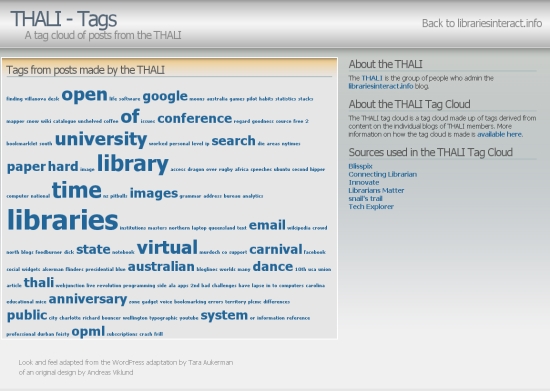
I’m using a wiki to write both papers – even the one I’m writing by myself. Why? One spot where I can record what I submitted, the acceptance email, upload the files they sent me about submitting the paper and draft each section.

For the co-authored paper, there is a table where we can record deadlines and who is doing what – and then we can read and comment on the separate wiki page for each section. When I’ve done this before, the wiki has been a place where co-authors could upload final, formatted WORD documents for others to download and check/correct.

The wiki I made for my paper is here, VALA – Do we remove all the walls. You can watch it as I write it over the next few weeks if you are really voyeuristic.

valawikipic.jpg

Here’s a “how to”

1. Get a free wiki at pbwiki

2. Copy and paste the text of the following to create a new wiki page. Link to them from the main page.

2.1 The abstract you sent

2.2 Author biography

2.3 The acceptance email

3. Upload any files, style guides, forms sent as pdfs or attachments. Link to them on the main page.

4. Create a table outlining each section, number of words, date due, proof read, notes, who will do each section.

5. Stop procrastinating. There is now no excuse. Get writing.

Library 2.0 on the Loose unconference

Uncategorized

It was great. It was FREE. Lots of people turned up. They liked it. We chatted. We engaged. We all pitched in. Presenters were the best kind of professional – knew their stuff and talked about it without fuss and frill. Feedback was positive.

Despite my nervous nelliness the night before, there were not too many people to fit in the spaces, the biscuits did turn up, I didn’t freeze during the powerpoint karaoke, there were enough pizzas and they were yummy, participants “got” it, there was no mass-confusion and anarchical walkout.

Feedback forms suggested topics for other unconferences, and maybe doing them for specific sectors. Good idea – go for it. After a very slow start and a change of cast we threw this one together in four weeks.

I’m hoping to be part of the Unconference at the Queensland State Library in October, but don’t plan to organise another one soon. I’d like to see another one in Western Australia. I did get the idea that a Libjam would be great. Like Webjam, except every presenter has 3 minutes to tell everyone something great, special or different about what your library is doing.

Look for things tagged Unconfwalib07 if you want to know more. Presentations should be up on the wiki by the end of September.

Here’s a mosaic from the day:

1. Matthias gets the program organised, 2. Making it up as she goes. Con does Power Point Karaoke, 3. Crowd watching PowerPoint Karaoke, 4. Sue. Power Point Karaoke DJ, 5. Finding time to learn about emerging technologies, 6. Lunchtime conversation, 7. Yum. Lunch, 8. Julie and Kate do lunch, 9. Alison and Con, probably talking about pizza, 10. Pizza boxes classified….Full on top, empty below, 11. Julie grabbed my camera and took a photo of me, 12. Glen, Hoi and ? watch Second Life and think about gaming, 13. Sue talks about Twitter, 14. Conference unplanners in action, 15. Lucia and Jenny gave presentations, 16. The view out the window of the State Library, 17. Rossemary and Dan, 18. Pimping the bookcart, 19. A hipper crowd of shushers at the Brass Monkey after the Library Unconference, Perth Western Australia 1, 20. After dark the gadgets came out at the Brass Monkey..