Library Camp Perth 2009: Keeping the fire burning. Registrations Open.

Uncategorized

Registrations are now open for the third Western Australian Library Unconference. There are 100 spots available. Last year it was booked out within two days.

This year we are calling the event: LibraryCamp Perth 2009: Keeping the Fire Burning . The agenda will be decided on the day by the participants. For more information about unconferences and what happened in 2007 and 2008, check out our Library Unconferences page.

Date: Saturday, 3 October 2009
Time:
9:30am for a 10am start. 4pm finish.
Venue: Central TAFE, 140 Royal St, East Perth. Map here.

Thanks to our generous sponsors below, there is no cost to participants – except time, energy, communication, expertise and engagement.

How to register

1. Put your details on the 2009 Registrations page. If you cannot attend please take your name off the list, and let one of the people on stand-by know.
2. Share your brilliant presentation idea.
3. Volunteer to help with set up and other practical jobs on the day.

Setting up a WordPress MU blogging platform for a university community

Uncategorized

I set up a WordPress MU installation for all staff and students at our university campus. It should have taken the team working on it about 3 months to finish the customization but it took about 18 months…and isn’t quite yet finished… We have had three classes use it over the last three semesters and have over 150  blogs – experimental and active – on it at the moment.

Here are some decisions we made.

1. Build evaluation into the pilot. I surveyed users in the pilot before they started blogging about what their expectations were, what would make their blog successful to them, the customisations they wanted and how they would like support. The platform went to production from pilot without me doing the follow-up study, but if the project  had not been supported, this would have been valuable data to have.

2. Document decisions, responsibilities and actions using a wiki. This was essential, particularly when a key member of the team left the institution three months after the project started.

3. Integrate with campus authentication. We wrote a plugin so that users log in via the university’s idiosyncratic authentication system. This is good for the users, but not so great underneath. It involved writing a script to do a nightly load of users into the WordPress MU system (so all people with university IDs also have a record on the WordPress MU system). The unique key for users in WordPress MU is the user email, whereas it is an ID number in our authentication system, and not everyone has an email address…so it is a little hard to data match.

4. Release all blog content under a Creative Commons license . I stole this idea from the blogging platform at the Harvard Law School . We customised the WpLicense plugin from the Creative Commons foundation . We changed it so that the default license is a Creative Commons Attribution-ShareAlike 2.5 Australia license…which involved a lot of poking about and was not as simple as it sounds. We also changed it so that one could add  a traditional Copyright license too.

MUB

5. Legal and privacy conditions. Again, I stole our Blogs – Legal Terms and Conditions and Blogs – Privacy Provisions from the Harvard Law School’s  blogging platform Terms, Conditions and Privacy policy , and worked with the university’s lawyers to change them for our institution’s needs.  We tried out the Terms of Service plugin that is only available on WPMU Dev Premium, but it didn’t do what we wanted so we had to write our own. This means that users have to agree to the Terms of Service at the time they create their blog.

6. Offer lots of themes . The beauty of WordPress is how versatile it is, so lots of themes to create different types of websites is essential. This also allows our community to learn about how to customise their digital presence. This was made easier by downloading the Farms 100 big ones theme pack . This is a bunch of WPMU themes originally tested and installed at Edublogs.org . We wrote our own custom plugin to add the same footer to every blog. (more in the plugins section below ). We also created six different “university branded” themes that were approved by our Public Relations department.

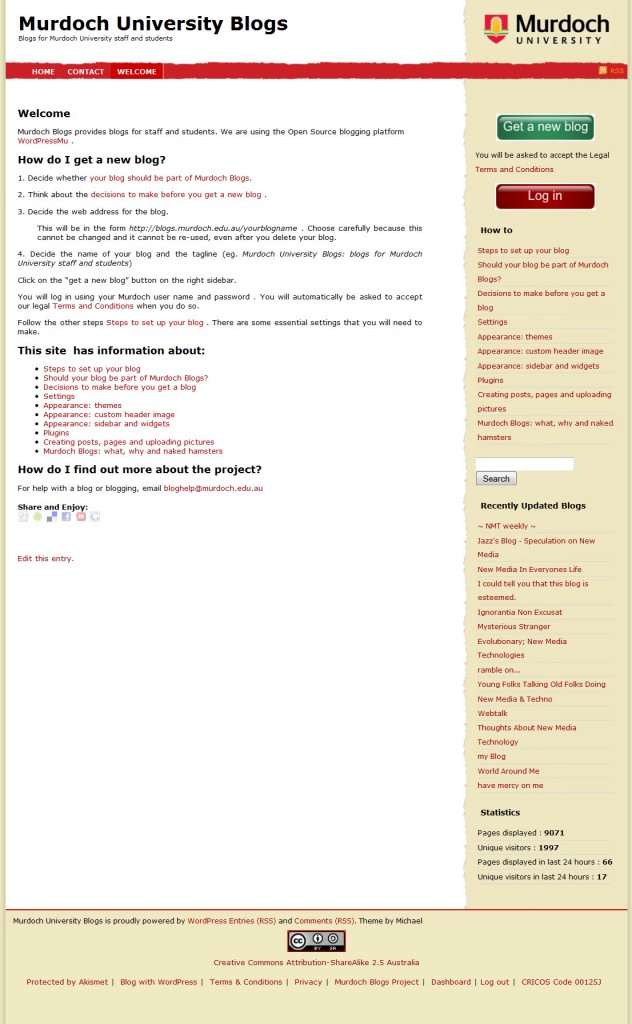
7. Be clear when the blogging platform should be used. The first step to setting up a blog on the platform is to  decide Should your blog be part of Murdoch Blogs? This is what I tell users:

It is not always sensible to host you blog on Murdoch Blogs. Sometimes it is essential that you do host it here. Below is an outline of when it makes sense and when it doesn’t.

WHEN NOT TO BLOG WITH MURDOCH BLOGS

  1. Your blog is not just work/study related
  2. You want ownership of it and to take it when you leave campus
  3. You want to use the blog for “personal branding”.
  4. The site is a “throw away” single use collaboration and you don’t mind the data being stored on a third party server
  5. You want to share access with someone without a MAIS login
  6. You want to customize the look and features more than the university can provide.

WHEN TO BLOG WITH MURDOCH BLOGS

  1. You are required to use a blog as part of your job/study
  2. Your data needs to be on University servers for ethical or business reasons
  3. If the intellectual property created belongs to the university
  4. If it is essential to have a murdoch.edu.au web address
  5. If students need to access it without using up internet QUOTA
  6. If you don’t have the skill or time to evaluate third party hosting options
  7. You want to set it so that only someone with a MAIS login can read it
  8. You want to use your MAIS login to access it
  9. You want a system that *may* be able to integrate with other information systems of the University
  10. The blog is not based on a specific Course Unit and the very basic blog facility of the Learning Management System is not sufficient
  11. You are concerned about Terms of Service on third party sites

HOSTING OPTIONS

There are three places to host your blog:

1. On a third party “get a blog” service where blogs are set up and  maintained on a web site. These are good for the beginner blogger. You can make quite a few changes to the look and functions of the blog, but generally these more limited than if you hosted the blog yourself.

Useful sites to get a blog are:

2. Buy web hosting and control your own installation. This is useful if you want to control all your data and customise your blog intricately. Many hosting services cost around $100 a year and have “one click” installations for blogs. You do have to have some technical knowledge.

3. Have your blog hosted by the University as part of Murdoch University blogs.

8. Choose minimum number of plugins . No matter how careful you are, plugins can break during upgrades or conflict with each other.

With WordPress MU, there are two levels of plugins.  Plugins in the MU-plugins directory are switched on for all blogs and cannot be switched off. Plugins in the plugins directory can be switched on by the administrator of each blog.

Here are the plugins that we ended up using:

Installation wide – in MU-plugins directory

  1. In-house authentication integration plugin
  2. In-house footer plugin – puts at the bottom of each blog
    1. Links to Akismet and “Blog with WordPress” – a condition of being granted an Akismet license
    2. Links to Legal Terms and Conditions and Privacy conditions
    3. Links to the root blog, dashboard and login to the system – for easy navigation
  3. Creative Commons plugin – puts a Creative Commons Attribution-ShareAlike 2.5 Australia license in the blog footer by default and allows user to select a different license if required
  4. Privacy Options – adds three extra options to the Settings > Privacy options . Extra options are
    1. All users on the blogging platform
    2. Registered subscribers to the blog
    3. Only admins
  5. Ada Active Blogs – lets you add a widget to the sidebar showing the blogs with the most posts
  6. Ada New Blogs – lets you add a widget to the sidebar showing the most recently added blogs on the installation
  7. Ada Updated Blogs – lets you add a widget to the sidebar showing the blogs with the most recent posts
  8. Akismet – spam protection. Needed to get a wordpress.com API key and also email wordpress.com in the way specified to get permission to use it in the institution as a non-profit.
  9. Anarchy media player – detects links to media like audio files and embeds a player in posts
  10. Allow Embedded Videos – allows users to embed YouTube, Flickr and Google videos
  11. List-All – Creates a list of all the blogs on the installation
  12. WYSIWYG print – creates a neater, tidier printout of a page for *most* themes.
  13. Default Theme – allows the installation administrator to set a specific theme as the default for all new blogs

Administrators can switch on for individual blogs – plugins directory

  1. Add RSS – allows you to manually add an RSS feed (eg. a Twitter feed)  that can be autodetected by Firefox or other web browsers
  2. FireStats – comprehensive statistics package that includes a widget for popular posts. Will only count statistics for posts created after the plugin in enabled
  3. Photo Dropper – adds a box to the bottom of page/post editor that allows you to search for a term and then automatically embed and attribute a Creative Commons licensed Flickr image on that topic.
  4. Sociable – adds links to popular social bookmarking sites
  5. Subscribe To Comments – lets users subscribe to further comments on any single post
  6. WordPress Video Plugin – a filter to allow embed of media from many different sites by using a specified code in the guidance
  7. Spam Karma 2 – spam blocker that is no longer supported, but adds a little more protection
  8. Unfiltered MU – this is a better alternative than WordPress Video Plugin or Allow Embedded Videos . It allows the administrator to let users embed javascript in posts

The following extra plugins in the plugins directory were requested by a user. I probably wouldn’t have included them otherwise. One of them slows down how quickly the individual blog loads, but I haven’t had a chance to isolate which

  1. Authors Widget – allows one to add a widget that lists authors
  2. Page Blocks – allows widgets to be added to the right or left , top or bottom of a page
  3. Snap Shots™ Plugin for WordPress.org – allows users to preview a screenshot of a link. It has advertising links as part of the window, some that link to our competitors
  4. Subscribe2 – emails new posts to specified address
  5. TinyMCE Advanced – expands the functionality of the visual editor for writing pages and posts

Reality 2.0: Transformational Librarianship. State Library of Western Australia

Uncategorized

Next Tuesday 11 August at 5:30pm,  a mob of  librarians are going to sit around for an hour and watch a video of Stephen Abram talking about “transformational librarianship” . Then everyone is going to talk about it. Then five of us from different library sectors will be on a panel talking about challenges of the future.

The event is a co-production of the Special Libraries Association, the State Library of Western Australia and the Australian Library and Information Association.

It will be a bit, but not quite, like this picture taken at Annalakshmi in Perth back in September 2007.

Here’s the information from the publicity:. I *think* you could still RSVP.

Do You Think Librarianship Is Changing?

Stephen Abram of SirsiDynix, SLA and Stephen’s Lighthouse fame does.

Find out more

Hear a summary of Stephen’s views on transformational librarianship and participate in a lively discussion with a panel of local librarians at the State Library of WA in August.

Think about the challenges facing our profession.

Find out who is using Web 2.0 tools and how.

Think about collaboration across the sectors and come and share your knowledge with special/academic/public/school librarians.

Where: Great Southern Room, Alexander Library Bldg, Francis St

When: 11th August, 5.30 – 7.00 pm

Cost: Gold coin donation

Refreshments: Wine and soft drinks and nibblies

Networking: Dinner afterwards for those interested in networking

RSVP: Monday 3rd August 2009

RSVP Contact: Annette Carter   92164542  annette.carter@chevron.com

Panel Members:

  • Kathryn Greenhill, Emerging Technologies Specialist, Murdoch University Library
  • Cheryl Hamill, Chief Librarian, Fremantle Hospital & Health Service
  • Alexandra Dailakis, Convenor Learning Resources Network, TAFEWA
  • Tricia Hille, Manager Library Services, Cottesloe-Peppermint Grove-Mosman Park Library
  • Annette Carter, Library & Information Resources Coordinator, Chevron Australia P/L

From Specialist to Special

Uncategorized

Michelle McLean and Andrew Finegan are both right.

Andrew, in his post about the freedom that comes with choosing very carefully where he will work next, Librarian Idol: Sabbatical :

…something that I’ve come to realise now is exactly how valuable my time is. And, for now, I want to keep that time for myself. Yes, it’s a financially-expensive option, but so many professionals these days complain about being time-poor. The question no longer seems to be a case of “How much money will you give me for my time”, but rather “How will I be spending my time with you as an employer?” and “Is there something I’d rather be doing with my time?” Time spent being bored or unhappy is time wasted, and nobody benefits from that.

Michelle, in her post about why she wants to go back to work full time and find a  more influential position and the impact this may have on her family, Connecting Librarian: Professional and Family Considerations :

…now I find I want to do more with my profession….I want to do more as a librarian, see if I can make more of an impact on our profession and in a library service and I can’t do that as well as I would like, working part-time at a lower middle-management level position. So that means going back to full-time work and all the impacts that would have on me and my family…

….I know I can make a difference in my profession and I know there will be differences at home, I just hope that we can all adapt to it as we have done in other situations before.

.

I’m leaning toward Andrew, with the greatest of respect for Michelle and the choices that are right for her.

I have a thesis to write that is not getting written. A kid who needs hours of extra help right now to get a solid foundation for High School in six months. A  job that requires more than the 30 hours that I am paid for – if it is to sparkle and make the difference that it is there to make. A husband who I rarely get time to be with because we have the domestic  responsibility baton-passing relay-race  down to a fine art. A six year old who is wonderfully independent and undemanding who I want to cuddle more. And me – I used to play the flute and garden and cycle and hang out with real-life friends.

Something had to give.

Fortunately, it did so in the best possible way. A series of fortunate events.

Event one: February-  Christine Mackenzie explaining that one of the reasons that Yarra Plenty Regional Library manages to move so nimbly and experiment with new technology is that their governance structure is an independent body that only runs the library, nothing else. Just like Casey Cardinia Library Corporation that is implementing a drupal website and the  Horowhenua Library Trust that gave the world Koha and Kete.

Event two: March  – Josh Byrne describing, at the local public librarians’ conference, the Environmentally Sustainable Design features that will be in the new Cottlesloe/Peppermint Grove/Mosman Park library. The three councils have approved a “state of the art” building that will be an educational showpiece . It includes a thermal maze, in-ground heat exchange, double glazing and efficient use of natural lighting. There is also energy and water-efficient fixtures and fittings such as dimmable lighting control and waterless urinals, rainwater harvesting, onsite treatment and reuse of wastewater, solar panels and stormwater treatment.

Event three: April . Visiting Darien Library in Connecticut and listening to the staff talk about how they made the transition in January from their old building to their new building built on Environmentally Sustainable Design principles….and the opportunity it gave them to re-think and improve how they served their community. They were very smart in their  re-organization of the non-fiction and the children’s sections –  looking at user needs rather than librarian’s needs

Event four: Realising that when I had spare time during my trip overseas I was voluntarily visiting innovative public libraries, rather than seeking out academic libraries…

By about half way through my trip, I had resolved that on my return to Perth, I would approach the Manager of Library Services at Peppermint Grove and let her know that I was interested in working in the library that seemed to have the right governance structure, resources and an exciting new opportunity to rethink services.

But I didn’t.

Chickened out.

Fortunately this library had an IT librarian who wanted to jobshare. I applied when the job was advertised a couple of months ago and I start there part time (two days a week) in the middle of August. I get to do Youth Services (Teens) as well. I will be a “Special Services Librarian”.

My kids think that my Murdoch job is waaaay cool (me too) and will miss the extra money (me too) , but they look forward to an unending supply of the latest fiction (me too) and a mum who is more available to them (ummmm…).

Working two days a week also gives me time to now say “yes” to people who ask me to do freelancing. Once my study is out of the way, and the new library is open, and I have taken that family holiday, and spent a bit more time in the garden…….

Multitouch computer tables for libraries (and cold cats)

Uncategorized

The first commercial multitouch table, the Surface Computer from Microsoft , was released in April 2008 and costs around AUD$20 000. Prohibitive for most libraries.

HOW IT WORKS

The camera under the tabletop detects where objects are and allows you to replicate mouse movements with your hands. Imagine mousing from many separate points on the surface and maybe with another pair of hands joining in – all working well to communicate with the attached computer. This lets you do things like show a pile of images like photographs and toss them around the table top, magnifying, editing and emailing using your hands, as though you were handling real objects.

HOW IT IS USED IN LIBRARIES

I was jealous when Darien Library created a little video of their new Surface Computer – and was lucky enough to get to play with it in their children’s area when I visited there in late March. It was apparent that this was a social device, where kids and caregivers can work together. Although there were only simple games on it, the potential is great. At the time, John Blyberg suggested a setup where a detector works out which book is resting on the Surface Computer and then reads an interactive story to the child.

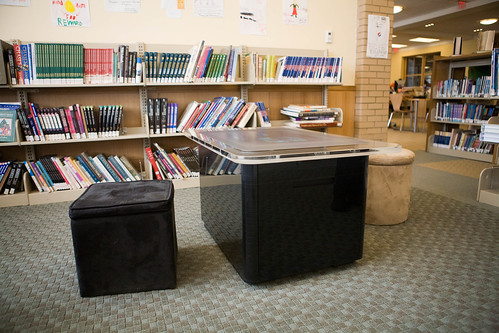
the surface table . Uploaded to Flickr on March 29, 2009 by cindiann

the surface table . Uploaded to Flickr on March 29, 2009 by cindiann

I was also lucky enough to finish my trip away at DOK Library Concept Center in Delft in the Netherlands. Last week the guys released a little video of a program created for the Microsoft Surface Computer by Koen Rotteveel. If you place your DOK library card on the surface, it reads the proprietary QR-like code on the back and then can retrieve historical images of the place where you live.

Multitouch Microsoft Surface: Cultural Heritage Browser from Jaap van de Geer on Vimeo.

DO IT YOURSELF ?

After the first Microsoft Surface Computer was released in 2008, there was quite a bit of reverse engineering happening. I was really excited when videos started appearing of how you can build your own multitouch computer using a cardboard box, tracing paper, plexiglass and a  webcam- like this example , How to Make a Cheap Multitouch Pad – MTmini

Most of the software to run these “do-it yourself” systems uses Jeff Han’s code – released for free – from his Multi-Touch Interaction Research

MY CAT LOVES A MULTITOUCH COMPUTER TOO

I came home my travels in April to find that my large computer monitor had been swiped and replaced by another one. My husband , Stewart,  needed it for parts for the multi-touch table he was developing as part of his work with the Institute for Multi-sensor processing & content analysis (IMPCA) at Curtin University.

They are building a multitouch table to work with therapy for people with autism. Acquiring language is very hard for some little kids with autism. A form of therapy called “Applied Behavioural Analysis” can involve repetitive sorting of image cards so that a child learns to categorise and generalise (eg. this looks like a dog, so it goes in the “dog” pile). Using a surface computer, images can be dealt and manipulated by child and therapist, and games incorporated as a reward when the child is performing well. The programs they have written for the table are simplistic, but it is as fully featured as a Surface table.

The best thing, though, is that they hope to produce their surface tables for under $500. My eyes lit up and I said “library” when he told me that. It’s not a plug for them, as they will not be in production immediately – but gives me hope that regular libraries will be able to incorporate multitouch computer tables as part of what they offer users.

You can see Stewart’s account of the way he created the prototype – what he did to my monitor, how he incorporated a Mac mini and keyboard in the casing – here in this blog post,  LCD Multitouch Table Mark 1 . There is even a photo of our cat, warming herself in the  computer table during development:

JISC – Libraries of the future video

Uncategorized

JISC , the UK based body that researches the innovative use of ICT in Higher Education education and research, has released an interesting 10 minute video discussing the future of academic libraries, JISC – Libraries of the Future . They are just finishing their year-long research programme about Libraries of the Future .

Libraries as bee-hives? Google as a partner? Librarians as network administrators as much as information specialists? Librarians “entrepreneurial, engaged and outward looking”? Investing thousands of pounds in change management programs?

(“Bring it on”, I say …)

WA Library Unconference. Join in the planning.

Uncategorized
The Third Western Australian Library Unconference will be held on Saturday 3 October 2009 at Central TAFE, Royal Street, East Perth. Thank you to Central TAFE for donating the venue.
 
Again we are aiming for it to be no cost to participants – except time, energy, communication, expertise and engagement.

Registrations for the 100 places will open at the end of August.

We want to keep things fresh, so are trying a Saturday this year. We understand that some people can only make it during work hours, but there are some people who are unable to come during work hours too.

 In keeping with the unconference ideas of “whoever comes is the right person”, and “whatever happens is the only thing that could have”, we are experimenting to see what happens with the combination of a weekend and a new venue.

We still are deciding on a theme, catering, sponsors, catering, start and finish times and more.

If you would like to sponsor the event, please contact Hoi Ng ( HNg@vicpark.wa.gov.au ) 

If you would like to join in as an unconference unplanner, we are having probably the only face to face unplanning meeting before the event on:
DATE : Sunday 9 August 2009
TIME : 2pm – 4pm
VENUE : X-Wray Cafe, Essex Street Fremantle.

Feel free to come along to the planning meeting, or to offer ideas via the google group: http://groups.google.com/group/unconfwalib .

Library professional organisations getting on the Cluetrain.

Uncategorized

The Cluetrain Manifesto turns ten this year. The 95 Theses are still relevant today.

I’ve been thinking about Cluetrain and how professional library associations should – or can- cope with the multiplicity of tools and fora discussing what they are doing.

I wonder whether the authors of the Cluetrain Manifesto would have thought that 10 years later organisations – and many of us individuals – would be looking at the changes to media and communication and scratching our heads saying “What happened, how did it get so fast and how do we use it now? “. Here are a few of the Cluetrain theses that I think are most relevant:

3. Conversations among human beings sound human. They are conducted in a human voice.
4. Whether delivering information, opinions, perspectives, dissenting arguments or humorous asides, the human voice is typically open, natural, uncontrived.
5 .People recognize each other as such from the sound of this voice.
6 .The Internet is enabling conversations among human beings that were simply not possible in the era of mass media.

…..

38. Human communities are based on discourse—on human speech about human concerns.
39. The community of discourse is the market.
40. Companies that do not belong to a community of discourse will die.
41. Companies make a religion of security, but this is largely a red herring. Most are protecting less against competitors than against their own market and workforce.

….

64. We want access to your corporate information, to your plans and strategies, your best thinking, your genuine knowledge. We will not settle for the 4-color brochure, for web sites chock-a-block with eye candy but lacking any substance.

…

94. To traditional corporations, networked conversations may appear confused, may sound confusing. But we are organizing faster than they are. We have better tools, more new ideas, no rules to slow us down.
95. We are waking up and linking to each other. We are watching. But we are not waiting.

I would add to this that the people who are talking about your organisation are those who care – passionately –  about what you do. They are taking time to gather with each other, talk about what you do and maybe – in fact probably – they would welcome the human voice from your organisation.

Can – and should – library professional organisations monitor all places where their members may be discussing what they do? Can – and should – organisations choose to continue the conversation via other media, rather than where their members are having discussions?

CILIP ATwitter in the UK

CILIP started me thinking about all this on 18 February when  Bob McKee, CILIP’s Chief Executive declared categorically that there was no place for a CILIP Twitter account, All of a Twitter .

There’s some twittering at present about whether CILIP has (or should have) any “official” presence on various lists or micro blog sites.

The simple answer, of course, is no. In terms of “official” activity, cyber life is just like real like – if it happens in a CILIP-sanctioned space, it’s official; if it happens down the pub or in someone else’s space, it isn’t.

Phil Bradley took Bob to task, CILIP – Epic Fail . I won’t repeat his excellently argued response, but one of the points he made was that the conversation on Twitter about CILIP was actually two weeks before, and the lag in the response was highly inappropriate.

ALIA from Australia in a hyperconnected world

As the Australian Library and Information Association has discovered this week, 24 hours is a long time in a hyperconnected world.

As best I can find, the announcement that IFLA is moving from Brisbane to Sweden in 2010 was made around 4:30pm AEST on Wednesday 8th.  (UPDATE 8:30pm 13 July 2009: Sue Hutley from ALIA has contacted me to clarify that the first email to members was sent at 6:30pm AEST, not 4:30pm) By midnight, discussions on Twitter among Australian librarians had spilled out onto a blog post at Libraries Interact about organising an alternative event during this time, IFLA 2010 .

The first official response  to the call for a different event came on ALIA’s board blog around 3ish the next day…. via Jan Richards the ALIA President,IFLA 2010. In this, she asks that:

True to the Australian spirit of “lets’ move on” the lists and emails are alive “where do we go from here?” “can we now have a biennial?” and innovative ideas for professional development and networking. As we have only lived with IFLA’s decision for less than 48 hours we still have a great deal to work through and I would urge you to be patient. The National Committee will meet again by teleconference next week to discuss future options and the ALIA Board has earmarked this as a priority item. In the interim let’s stay focused and resist the temptation to organise a plethora of unrelated events.

In other words – “we are discussing it among ourselves, not in public and will let you know when we know more”. Fair enough.

That would have been a very reasonable position three years ago. Is it today? I don’t know, but I suspect that if this happened in a year’s time, then it would definitely not be.

I think that ALIA  – and other library professional associations – can learn a few things from how this was handled:

1. It would have been very useful to have a media strategy during a crisis to be present online on Twitter, email lists etc other than speaking in “press release” style communication.  A strategy to telephone some members directly about what they were saying on email lists, rather than engaging with them on the lists may not have been the best one. Easy for me to say – I guess the office did not have staffing enough to do this and was handling a lot all of a sudden … but I think this will be a greater priority in the future. The time it took to telephone one or two members may have been better channeled toward communicating on email lists, blogs or Twitter.

2. While it was a good move to comment on the blog post at Libraries Interact and offer to communicate, giving out a phone number and offering to talk one to one was probably not the way that people on that forum prefer to communicate. It would also have inspired more confidence in the association’s ability to technically handle new media if someone from ALIA office had directly posted the comment, not got someone else to post it on their behalf.

3. Not allowing comments on the ALIA Board Blog forces the online conversation elsewhere. Much harder to monitor . Much harder for supporters to show support. I think that in the future, providing public online space for members to discuss the organisiations’ decisions will  be a requisite function of a professional organisation.

When asked via Twitter why there were no comments allowed on the Board Blog, @ALIANational answered that the reason was “apparently technical”. That sounds really, really odd to me. A procedural, administrative decision or a  skills-based decision maybe. Given that it looks like a WordPress blog with a modified Kubrick theme, all they would need to do technically is change one setting under Setttings > Discussion….. or to change the setting on the individual blog post to allow comments… which overrides the “Discussion” setting  anyhow.

ALIADiscussion

ALA and ALASecrets2009 in Chicago, USA

Hiring Jenny Levine was one of the smartest ways that the ALA has tried to cope with issues raised by Cluetrain.  Check out the member’s online space, ALAConnect for an example of how a good Drupal installation integrated with iMIS can work to provide online space for communication between members and each other, and the organisation. Jenny’s efforts to evangelise and make people feel at home there are just as important as the technical setup.

The most bizarre and entertaining example of how new media can challenge a library professional association is happening right now at the American Library Association Conference.

I’m not sure there is anything ALA can or should do right now, but association members are chatting very publicly about an event being held by the association – and in a very different voice to that which the organisation uses.

Like bored schoolkids a few people set up an @ALASecrets account on Twitter. They gave out the password and told people to post. Look at a Twitter search for ALASecrets and you will see what I mean. The most re-tweeted post?

#ala2009 has confirmed what have suspected for years. Librarians mostly function on sex, alcohol and wifi. Everything else is meh

Someone among librarians – those protectors against censorship of information – took exception to the fun, logged in with the password then changed the password to something else and made the account a protected (non-public) one.

Within a couple of hours, the concept was back and censor-proof. Now an email to s53gyb@twittermail.com will post directly to a new account, ALASecrets2009 . There are a few other ways to post, as detailed in this post , ALA Secrets , at the not all bits blog.
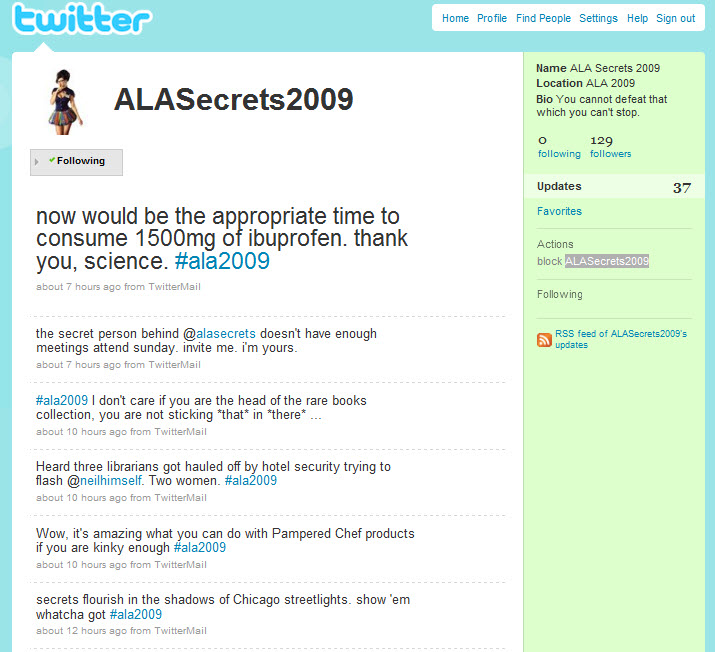
ALASecrets2009

.

…We are organizing faster than they are. We have better tools, more new ideas, no rules to slow us down…. We are waking up and linking to each other. We are watching. But we are not waiting….

Emerging Technologies: Background, tools and challenges for Higher Education

Uncategorized

I was invited to present to the Educational Technology Committee at MPOW about emerging technologies likely to affect education. Here is the slideset to accompany my 30 minute presentation, Emerging Technologies: background, tools and challenges for Higher Education .

FURTHER READING

LIBRARY WEB2.0 LEARNING PROGRAMME FOR STAFF AND STUDENTS

Web 2.0 Easier, faster, friendlier

The 14 Things that we cover:

Book Crossing Ahead

Uncategorized

It would be a really, really inspired idea to take discarded library  books to the local train station during Library Week and give them to local commuters to read on their journey.

BookCrossing

It was genius, however, for the team at Rosanna Library in Melbourne to do some guerrilla indoctrination of Ranganathan’s First Law: “Books are for use” . They added to each item a Bookcrossing tag, so that commuters could register the book on the website and track its progress around the world as they gave it away to the next reader.

Chris MacKenzie, CEO of Yarra Plenty Regional Library ( one of the most innovative public library systems in Australia ) tells the story further in her blog, Bookcrossing at Rosanna Railway Station .

Andrea, the Branch Manager at Rosanna sent me this email on Friday:

“We have just finished a very successful Library Week activity at Rosanna railway station.

We set up a table at the station for four mornings this week between 8am and 10am. Joyce handed out library publicity and offered commuters a free withdrawn book – adult fiction or paperback – each one with a BookCrossing tag and a registration number.

The idea is that readers register their title on the BookCrossing website then read it and pass it on to a friend or leave it somewhere to be picked up by the next reader, who also registers on the website. The website tracks the book’s progress around Melbourne or Australia or even overseas and we can also check out the readers’ comments about the books (and the “friendly librarian at Rosanna station”).

The feedback from both commuters and Connex staff has been extremely positive – Connex have asked if we can do this again during the next school holidays but some commuters have already asked if we could do this once a week.

Commuters were happy – not just to get something for free but they were intrigued by the BookCrossing idea and pleasantly surprised to see friendly library staff out and about early on a cold morning at the station. Perhaps having a book to read on the train and switch off was also a more inviting prospect than reading the daily news. We have been checking the website and it appears that many commuters have logged on to BookCrossing as soon as they got to work and registered.”