Back to writing
Lecture notes
In the first half of this year I was unit coordinator for three units – Introduction to Libraries, Public Librarianship and Information Management Technologies. Each lot of lecture notes is around 3500 words, with a few sitting at 5500. Some of the material had not been given a thorough going-over in a long time- some week’s topics had no notes at all, some were so outdated that I did not think it was exactly ethical to release them without a lot of research, updating and rewriting. (Honestly, I purged some material that had been topical – and I remembered being on the course – when I took one of the units over 20 years ago. Australia Card anyone? ).
So – three months of reading and editing – or totally rewriting – about 9000 words per week. Enough to dry up any blog-juice I might have had left over.
Research writing
This semester I only have about 100 students in a single unit – Information Management Technologies, spread over 4 months with half the cohort starting 6 weeks after the first lot. So – now, a year after starting this job, I have more time to look at the research writing part.
I am currently working on:
- My keynote for the New Librarians’ Symposium on 18 September. This goes way outside my comfort zone, which is usually speaking about new technology and wizz-bangedness. I chose instead to talk about The Hidden Rulebook: Building bridges instead of banging your head against a brick wall – trying to share some of what I have learned about working in libraries since being a New Librarian. It is really challenging to try to write something that does not seem like utterly self-indulgent oversharing.
- Trying to get my Master’s Thesis into a tighter, more targeted format as a journal article all about why libraries developed their own Open Source Software.
- With Con Wiebrands , a paper for the VALA2012 conference next February, looking at the possible effects on libraries of “free and easy” online content sharing – both legal and illegal. At the moment, we are having too much fun finding sites to show as examples and trying to narrow down our main points.
- Trying to find a PhD topic with a view to starting something in the next year. So far I have three or four favourite topics, but the need to spread it over 6 years part-time means I have to choose something that takes advantage of the time-span, is not dependent on a new technology and that will keep me interested for 6 entire years.
Writing tools
Probably procrastination, but I have been experimenting with these three tools.
Popplet.
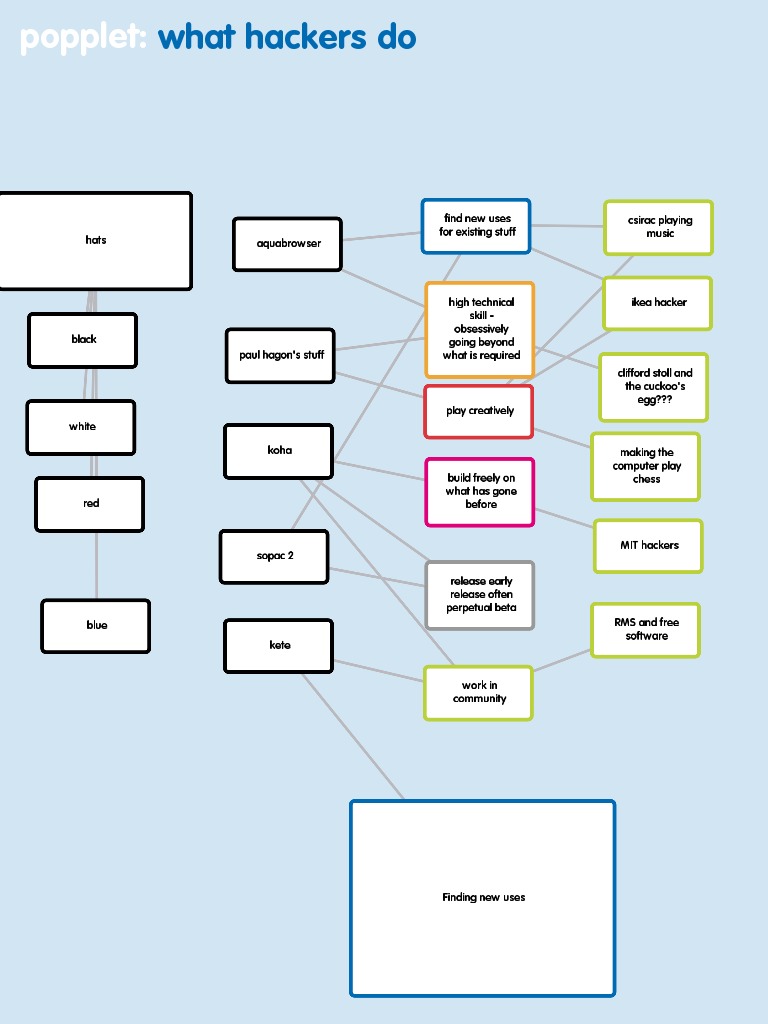
I use the iPad version of Popplet. It is a bit like mind-mapping software, but more for drawing out the relationships between ideas. One can create little boxes (popples !) and link them to others. The boxes can contain words or images or movies and can link to a number of other popples. It is a great way to group like ideas and see how they interrelate. You can flick each box around the screen with your fingers and easily rearrange them. Here is a schematic map I made when I wanted to work out how specific examples of library hacking matched general computing examples of hacking – and what the common features might be:
Zotero stand alone.
The beta stand-alone version is now available. I gave this citation management tool a burl this morning. I think that it fills a gap for people who do not use Firefox as a preferred browser, or who are often not connected to the internet. Only one version of Zotero will run at a time with the same database, so I have to close Firefox to use the standalone version. Not so useful for me.
Zotero itself has taken the place of any social bookmarking like delicious or diigo. Con and I used it to collect references for our VALA2010 paper over the last couple of months – just adding to a shared group library. We read through and tagged these references and pulled out useful quotes, so now as we write up the paper, we just click on a tag and instantly have a list of references on that topic.
Scrivener
Scrivener is a tool designed for long-form writing like novels, screenplays and theses. I am trying it out for our VALA2010 paper. I found the text-heavy one hour tutorial invaluable for understanding how it works.
Scrivener Organising It lets me divide the paper into “chunks” and work on just a single chunk. I can then see the chunks represented as index cards on a pinboard and rearrange the sections into an order that suits me. Con and I have divided up the headings for our paper. In Scrivener, I have made cards for each of my headings, but then subcards where I can work on individual paragraphs that I may want to shift around. When I am happy with the order, I can then choose which bits I want to sew together, arrange it and export the whole lot into something like WORD for a final tidy up.
Scrivener Storing Scrivener also allows an author to store, organise, access and notate documents relevant to the work, like pdfs, audio files or video files. So if I had 20 key references I could store them in Scrivener. I use Zotero for this already. I can understand, however, someone who wanted to keep track of characters or events in a novel using this extensively.
A bit of a deal-breaker is the lack of easy integration of Zotero with Scrivener. It is understandable that, with a much smaller user-base, there is no plugin written for Scrivener like there is for WORD. It would be great to be able to drop references in-text and have an automatically generated Reference List. Elizabeth Goodman has written a workaround for Integrating Zotero and Scrivener for citation management , which I aim to try out in the next couple of weeks.
Young Adult novellist, Justine Larbalestier blogged last week about how she used Scrivener to write her award-winning novel, Liar. Scrivener’s functionality is clear in her account of how she used the program to make sure she kept to her structural pattern of “Before”, “After” and “Backstory”.
Scrivener started as Mac-only software, but there are now beta versions available for Windows and for Linux . It is shareware that costs around $45 after the first 30 (nonconsecutive) days of free trial.