
The wonderful Peta has put together three files of RSS feeds for #blogjune blogs, that can be imported into an RSS reader.
I have combined these into one file available here: https://www.dropbox.com/s/ma7o2rq8rygce2d/BlogJune2016PetasFeeds.opml?dl=0 .
What do you do with it?
- Download the file and make sure that it is saved as “BlogJune2016PetasFeeds.opml“. Sometimes it will automatically open in a text reader and will have a .txt extension if you do not check it. If it opens as text in your web browser, then copy the lot and manually paste it into a text file and save it with the right name.
- Go to Feedly RSS reader and get an account. Download the app if you are inclined to.
- Scroll down to find the button that says “Add content”. For some pages there will be a tiny list of links at the bottom. You should click on “Import OPML” in this case.
- You will see a screen that looks like this:
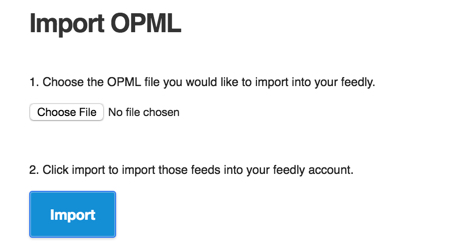
- Choose and upload the file
- You will see a list of blogs in the left hand side of the screen. You can display these in several different ways by changing preferences, from list of one line per entry to magazine style with pretty pictures.
Enjoy. Go forth and read and comment 🙂
Thanks for the combined file! I’ve been procrastinating about subscribing but now I’m all sorted!
Thanks for putting this together! Will have a go at subscribing this pm.
There is a little mixup in the file:
The two URLs have been inverted. I could change the file but not sure if people would download file that is in the comments?
Sorry, comment did not include the mixed up URLs. Here they are :
http://sonjabarfoed.com/feed/
https://petradumbell.wordpress.com/feed/
Here is the corrected file: https://www.dropbox.com/s/iaxqasp7jvmadfc/BlogJune2016PetasFeeds-corrected.opml?dl=0
Sorry for multitude of comments. Don’t need to publish them all 🙂