Data as a social space.

Uncategorized

A change is happening in how we relate to our documents and data. We’re moving toward using them as social spaces.

At conferences, where the presentations and papers (the “data”) are the ostensible reason for people to be there, I’ve always found the informal exchange (the “social”) much more fun and beneficial. This is now happening online. Here’s some examples of what I mean…

1. Adding a “meebo me” widget to your library home page. Users don’t have to leave the site to connect with a librarian.

2. A “discuss” function in google docs. Ryan, the Other Librarian, and I have been sharing a couple of google docs while we work on a library related something. Last night I noticed the “discuss” tab on a shared spreadsheet and emailed him so we could test it out. While “in” the document, we were chatting, and uploading and amending the document. We could have opened another document and continued our chat there. He’s in Canada, and – while I can pretend to be a jaded, 2.0 kind of gal, used to the way the net has shrunk the world – I still found it novel and it gave me a buzz.

3. A couple of weeks ago I blogged on VLINT about visiting the Michigan Library Consortium’s library in Second Life and climbing all over a 3D graph they had, representing library membership.
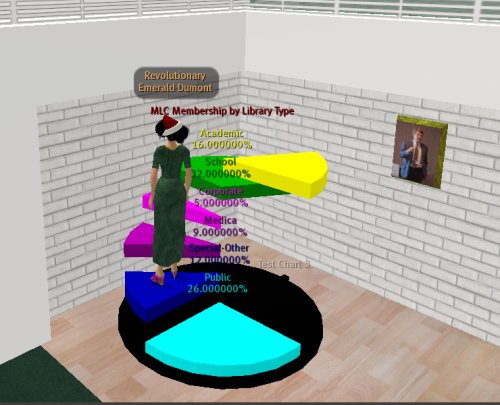
mlcpiegraph_001.jpeg

4. Distance learning in Second Life. I can imagine a building set up with all the resources needed for a class…links to external sites and cached documents..video presentations available on a player. The difference between that and a tradtional web site is that students can send their avs. to that “place” and see who else is there. While accessing the info, they can discuss their experience of the course and are more likely to ask each other for help once they have made that casual contact. More like the intangible social and academic benefits gained by going to lectures or tutes on campus.

TODAY’S HIPPIE CARD: Up until now
Screencasting, collaborating and voiceover

Uncategorized

It’s done, done. “Done!” I say.

I’ve finished my screencast for my presentation for Five Weeks to a Social Library. It’s called “A puppy with a new ball: engaging library staff in social networking tools during the MULTA project“. It’s due on 12 January for use early March, so I’ll upload it next week.

Now I’ve migrated my blog and done this, I’m taking a week away from the ‘net. More or less. You may not hear from me for a while.

The screencast is now with Dennis who’s doing the background music. He’s a musician and librarian from Rhode Island. We met in Second Life and he offered to do it. I’d heard his music, liked it and felt rather 2.0 when I said “yes please”. I’m feeling a bit nervous about it, but I guess risk taking is part of this new way of working. We’re using all sorts of ‘net places. We were in SL and skype-ing last night. I’ve published my file on my webspace, shared a gmail spreadsheet and used email. I like it.

I’ve also been collaborating with LB who works in another part of the Uni and has been making films for over 20 years. She wants to know about screencasting and new social software, so we’re doing a bit of skills exchange. She filmed me and several other staff talking about the project. We’ve taken stills and audio from her footage. I’ve added in a few screenshots and animations, plus more audio. I’m worried now that it will be too large for the participants to download if they are on broadband.

Captivate is a dog of a program and I never want to use it again. Captivate was great for storyboarding and easy editing. It took about 5 minutes to generate a 5 slide preview, and when I wanted to check the entire compiled screencast, I had time to make the kids lunch, and eat it with them before it started playing. I hear that v2 is on the market and hope it’s better.

I was dreading capturing, choosing and inserting images of myself. LB picked key points in my storyboard and pointed out that people would want to see me speaking there.

Doing the voiceover made me squirm even more, which I hadn’t expected. I look at myself in the mirror every day, but I don’t hear my voice as others hear it. My first attempt sounded like that voice you hear announcing flloors in a lift. Really dull and librarian-y. The next pass was a scary, hyper lady, full of false cheeriness.

Finally, I imagined that someone whose blog I read was sitting across from me. I presumed she didn’t know anything about the project and might not understand my accent. That made it a lot easier. Thanks Iris.

I still sound a bit more downbeat than I actually am, but this may be an advantage.

LB had some great tips for editing audio. She can intuitively pick out the “beats”, and suggest where there should be pauses. She explained how adding silence can actually make something, that was uncomfortably rushed, easier to listen to and thus sound shorter. Captivate is not good for this process as it’s hard to keep checking and measure the rhythm when it takes so much time to generate the preview.

Aaaaahhhhh. It’s done.

How to move your blog from Blogger Beta to WordPress

Uncategorized

Here’s how I migrated my blogger blog from Blogger Beta to WordPress on my own server. Hope it helps you if you are doing the same thing.

I’ve not included information about how to install WordPress on your server. Many hosts have tools for “one click” installation.

Between each step there should be one that says: “Check, play, fiddle, tweak, check”. Boring to repeat. Essential to do.

1.DECIDED TEMPLATE

  • Looked at some other liblogarians WordPress blogs to find formatting and functions to steal emulate.
  • Sketched what I wanted on a bit of paper.
  • Spent a couple of days trawling through WordPress themes to find one near enough.
  • Discovered iLoveMusic.
  • Fiddled with it for about a week on a test database, so that I just had to upload the plugin ready template to my new live installation.

2.DECIDED PLUGINS

  • I searched google, WordPress support and WordPress codex to find plugins to do what I wanted. I entered things like “embed YouTube” or “print pages”, rather than techie terms.
  • I followed comments on the plugin pages back to blogs that used the plugin, so I could check the plugin in action.
  • Here’s what I used:
  • Anarchy Media Player. Allows me to embed YouTube clips in my posts, or a media player to play many different file formats
  • Blogger Image Import see 5. below.
  • Simple-Recent-Comments WordPress doesn’t have code to display recent comments, so this does the trick
  • Dr Dave’s Spam Karma A must-have. After using it for 6 months on LINT, only 3 spams have got through – and they seem to be hand entered. We have up to 200 spams stopped per day.
  • Ultimate Tag Warrior Tags, tag cloud, relevant posts…and much more than I implemented.
  • WP-Print This one’s for Walt Crawford. Clicking on “print this post” strips the crap from your post and produces a short and sweet version ready for printing.

3.Posted a message on my old blog that I was fiddling about in case I accidentally flooded people’s aggregators.

4. IMPORTED POSTS AND COMMENTS FROM BLOGGER BETA TO WORDPRESS

  • i) Use the script while you can, as one small tweak from blogger and it will no longer work
  • ii) Remove the script from your server when it is finished,as it is a security risk
  • It worked like a dream. The only thing I did differently was to add a footer to the blogger RSS feed so that the imported posts indicated they were from the old version of the blog.
  • 5. IMPORTED IMAGES FROM BLOGGER BETA

    • Used Notions’ Blogger Image Import. This copies the images from the blogger server, loads them locally, then changes the links in the posts to point to the local copy.

    6. AFTER THE IMPORT – WHAT I DID

    • Checked and configured all WordPress Options.
    • Activated plugins and configured.
    • Changed any formatting from blogger.
    • Checked that the existing feeds worked OK.
    • I already had a Feedburner feed, so I changed the originating feed from my blogger feed to my WordPress one.
    • Burnt a Feedburner feed for the comments.
    • Added a “number of readers” badge to the side bar – available from Feedburner.
    • Followed the instructions at Feedburner to change the header file so that browsers autodiscover the Feedburner feeds, not the existing ones.
    • Added a sitemeter
    • I decided not to go to Bloglines and claim the feed then mark it as a duplicate of the Feedburner one, but YMMV.
    • Went to technorati and claimed the blog
    • From the WordPress dashboard, went to Options > Writing to add the ping for technorati to my blog
    • Found and embedded an appropriate Creative Commons license.
    • Used MicroAngelo to create a tiny image to use as the favicon to display in Firefox. The Gimp doesn’t create .ico files.
    • Created a favicon.ico file on the root directory where the blog was.
    • Went to any sites where I’d registered my website and changed it.

    7. Still to do:

    • Strip the arial font and purple colour I used on all blogger posts.
    • Add tags to all posts.

    Hope this helps.

    TODAY’S HIPPIE CARD: New Beginning

    New site..please come and play…

    Uncategorized

    ‘Tis the season for blog migrations. Steve Lawson did it today. Library Garden is thinking of doing it. Now I’ve done it.

    Librarians Matter now lives at: http://librariansmatter.com

    Please take time to pop in and let me know if there’s anything you’d like to see changed or added. You could comment on this post or try out the new “Contact” page from the menu bar.

    If you like elephants, owls, juggling balls, bangles, seashells, microscopes, shortbread, crystal vases or books,books,book, then you’ll get along with my new blog just fine. Here’s what you can expect:

    header.jpg

    TODAY’S HIPPIE CARD: Lovers

    Message on my blogger blog

    Uncategorized

    Here’s what I wrote tonight on my blogger blog:

    I’m putting the finishing touches on migration from Blogger Beta to WordPress on my own domain, in time for 1 January 2007.

    When it’s done, I’ll do a couple of big posts on the lines of “Wow..THESE are the plugins to use if you’re going to do THAT” and “Welcome to my new place, here’s the details”.

    Here’s a sneak preview of the header:

    sneakybanner.jpg

    If I’ve previously linked to any posts on your blog, you may notice new pingbacks from my new domain. That happens when my old posts get imported to WordPress

    Posts from the new blog should just appear in the Feedburner feed, without you having to do anything. If you don’t subscribe through the feedburner feed, here’s the details: http://feeds.feedburner.com/LibrariansMatter. I’m guessing that when the new blog is fed in, the 111 previous posts from this blog will show up in your aggregator. Apologies for this in advance.

    I’m busy, busy, busy and having fun, fun, fun so will update more soon.

    New job descriptions for libraries

    Uncategorized

    When people ask me “what do you work as?”, I can easily say “Reference Librarian and Philosophy Subject librarian”. The other bit of my job, which is looking at emerging technologies and how we can use them in our library, doesn’t have an official label or job title.

    Back in June, when thinking about what Librarian 2.0 jobs would look like for Australian libraries, I said:

    I suspect Librarian 2.0 positions will be created as people in existing positions redefine their jobs and add a bit here, drop a few responsibilities there.

    I’m really excited by a trend in the US, one that I hope will hit here. Entire postitions are being created for librarians to do tasks that didn’t even exist 2 or 3 years ago. I’m encouraged by the Emergent Technology Librarian at East Michigan University Library and the ten (yes, ten!!) new positions being funded at the Albany Library at the State University of New York.

    1. EMERGENT TECHNOLOGIES LIBRARIAN at the East Michigan Univeristy Library

    I chuckled when the ad posted on Web4Lib said they were looking for an applicant with “mad skillz”. Made me feel about 100 years old and terribly unhip.

    Position Description:

    The Eastern Michigan University Library seeks a proactive, creative, service-oriented individual to play a key role on its Information Services Team. The Emergent Technologies Librarian will serve as an explorer of and advocate for the use of emergent technologies to support online learning and enhance the effectiveness of library information and instructional services . The Emergent Technologies librarian will coordinate virtual/chat reference initiatives and provide scheduled reference assistance (face-to-face, email, telephone, virtual/chat).

    Responsibilities:

    •  
      1. Social Networking Support Librarian
      2. Collaborative Publishing Librarian
      3. Multimedia Publishing Librarian
      4. Coordinator of Student Participation
      5. Programming Risk Taker
      6. OPAC Transformation Librarian
      7. Testbed Technologist
      8. Remote User Librarian..
      • Explore, evaluate, and encourage the deployment of emergent technologies to engage library users and staff in new ways
      • Provide training and support for other librarians on emergent technologies
      • Explore and develop opportunities to integrate library resources and services into course management, online learning, and other campus software initiatives
      • Collaborate with other librarians to develop online learning initiatives
      • Coordinate, assess, and work with other librarians to evolve virtual/chat reference initiatives
      • Provide scheduled reference desk and virtual/chat reference service, including some evening and weekend hours
    • 2.Ten new postions at SUNY

      Laura Cohen’s library has just received “huge, anonymous donation to fund ten new positions for as long as we want them”. (Yes, Virginia, there is a Library Santa Claus). They’ve set aside one position to use later. With the other positions, they are dreaming big, and realise that there is overlap between the positions:

      and the one that really caught my fancy…. After 38 years, I finally know what I want to do when I grow up!!

      9. Exploration and Training Librarian:

      Does what all librarians should do but wlll get to do it full time: read, experiment, play, develop skills, listen to conference and training broadcasts, imagine and ruminate. Will develop a seminar program to present colleagues with the results of these efforts. Will assist colleagues in determining new ways of doing things based on these explorations. Will recommend readings, Web sites, podcasts, RSS feeds, etc., to assist in staff education. Establishes a culture of fun-loving, beta-craving, humorous attitude toward change.

      TODAY’S HIPPIE CARD Let go of the past

      UPDATE: A couple of hours after I wrote this, into my aggregator popped an article from Michael Stephens on ALA Techsource that nicely summarises the last year of Librarian2.0 job descriptions in the US. Desperately seeking the adaptive librarian: on the 2.0 job description (part 3) .

      UPDATE AGAIN: 1 January 2007: Alas, There is no Library Santa Claus, please see Laura Cohen’s comment below. I could pretend that I wasn’t taken in, but instead I’ll admit to being very sloppy and not reading carefully, and say I’m very sorry that I didn’t pay closer attention to what she wrote. She did actually list 10 positions, including “Digitization Librarian”. On her blog, Library 2.0, And Academic’s Perspective, you can see more of Laura’s thinking about how we need to reformulate all library job descriptions to meet the demands of Library2.0.

    How my local library is getting it right for me

    Uncategorized

    Just visited my local public library for the first time in about 3 months.

    They’ve upgraded their website and a new feature caught my eye. New users can create a temporary membership online. This allows them to reserve items today, and provide their ID when they come to collect the item. A quick trawling of the web reveals this is probably “bog standard” with the Spydus ILS. I also liked the “item not in our library – fill in this request form and we’ll try to get it” option.

    As someone who once joined up 4 family members at a loans desk, while trying to control a bored two year old, I applaud this. I would have loved to have entered our family’s details at my leisure and then known that what I wanted was ready for pickup BEFORE I ventured to the new library.

    .
    I registered both kids for an interactive storytelling of Charlotte’s Web with riveting “get-em-up-off-their-bums-and-moving” storyteller, Glenn Swift next month. Having visited Narnia with him last year and re-enacted the battle scene in the library with spaghetti string and balloon swords, they can’t wait (OK…me neither!).

    Mr 9 also joined in the Australia wide Summer Reading Club..after seeing at the front door the cool prizes he could win. He received a very nice “showbag” of reading related activities, including a “choose your book type” flowchart quiz, that steered him toward book choices that would suit him. He gets to go to a party where they dish out the prizes at the end of January.
    .
    The library also had very bright new signage – not just a small part of the shelf labelled, but large cardboard cutouts taking up the entire side of the shelf, top to bottom. Very clear and made each shelf feel individual, and like it held an adventure.

    I left the library as one happy user.

    TODAY’S HIPPIE CARD: Gentle Okayness

    The “To Be Read” Challenge

    Uncategorized

    This looks like fun, so I’m doing it. The “To Be Read” Challenge from MizB of Literary Cache. I found it via Wanderings of a Student Librarian.

    The idea is that before 1 January 2007, you list in your blog 12 books that have been on you TBR list for more than 6 months. Then, you read one per month. And..there’s a sweetener from MizB:

    Every 3 months, for the duration of the challenge, I will pick one challenge participant’s name from a “hat”. That person –if they’ve read the amount of books for that time (ie: 3 books in 3 months; 6 books in 6 months, etc)– will receive a small gift (via snail-mail) from me.

    If you have a “Staff’s favourite picks” list on your website or posted in your library, why not add a “Staff’s TBR list”? It would be great to share with your users, they’d get to know a bit more about you, about some of your bookstock and it would provide such an interesting talking point.

    As I wrote the last paragraph, I thought “of course, this would only apply to public libraries”. But I’m wondering….”Why couldn’t we do it in an academic library?”. Too worried about our credibility as a research institution, or that our users don’t come to us for THAT kind of thing. If not, why not?

    Here’s my list. It turned out to be harder than I thought. I’ve just found out that I’m pretty good at following up and reading books on my TBR list:

    1. A delicate balance – Rohinton MISTRY
    2. Tipping point: how little things can make a big difference – Malcolm GLADWELL
    3. Born on a blue day – Daniel TAMMET
    4. A spot of bother – Mark HADDON
    5. Martini: a memoir – Frank MOOREHOUSE
    6. A prayer for Owen Meany – John IRVING
    7. The night watch – Sarah WATERS
    8. I know why the caged bird sings – Maya ANGELOU
    9. The tent – Margaret ATTWOOD
    10. The bone people – Keri HULME
    11. One hundred years of solitude – Gabriel GARCIA MARQUEZ
    12. History of Western Philosophy – Bertrand RUSSELL

    Special mentions, but published in the last 6 months:

    1. The inheritance of loss – Kiran DESAI
    2. Chart throb – Ben ELTON
    3. Moral disorder – Margaret ATTWOOD

    UPDATE 29.12.06: This one has been sitting on my bedside table so long that it’s become part of the furniture:

    • Johnathon Strange and Mr Norrell – Susanna CLARKE

    Embedding YouTube

    Uncategorized

    WordPress strips the code when I try to embed a YouTube video. Their support page has one suggestion, but when I checked out the WordPress video plugins page, I found the anarchy media player.
    It’s Australian and will let me embed all sorts of video formats. Here’s how it described itself:

    Anarchy Media Player 1.6 for WordPress, WordPressMu and Standalone Javascript will play any simple href link to mp3, flv, Quicktime mov, mp4, m4v, m4a, m4b, 3gp as well as Windows wmv, avi and asf files, in the appropriate player on your web page. The WordPress versions also add buttons to the Rich Text Editor for embedding Flash swf and Director dcr movies as well as YouTube, Google Video, iFilm, DailyMotion, Revver, Metacafe, MySpace, Apple iTunes iMix, and GoEar players.

    Sooo…I’ve downloaded the plugin and will use it to embed my “Happy Holidays” video in the next post.

    (If you pay attention to such things, you’ll notice that this post wasn’t made on my blogger blog.
